What Is SEO (Search Engine Optimization)?
SEO stands for 'Search Engine Optimization.' It is the work of helping search engines accurately understand the content of your website and optimizing your structure and content so that your web pages rank at the top in line with the intent behind the keywords users search for.
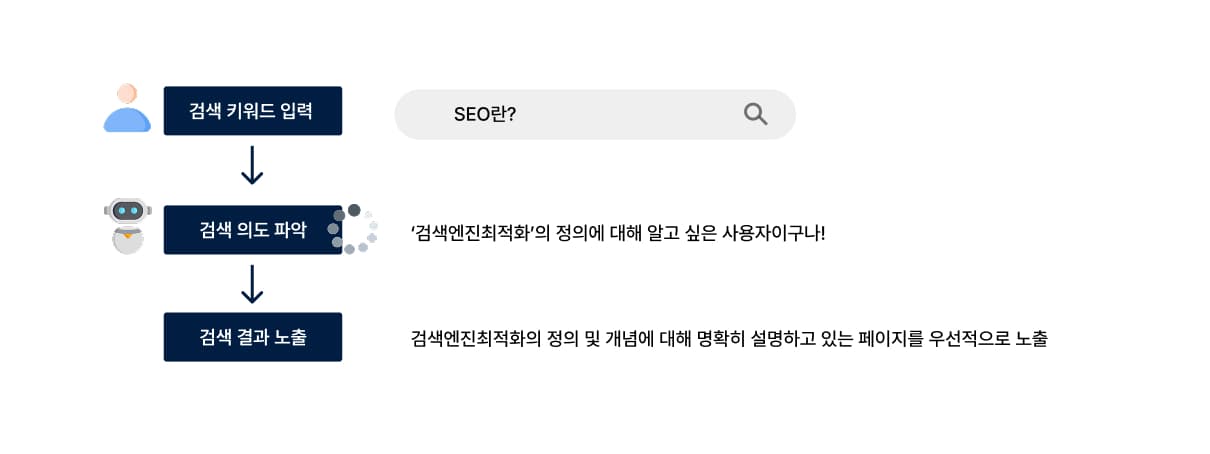
For example, a user who searches for 'What is SEO?' is someone who wants to know 'the definition of search engine optimization (= search intent).' Accordingly, search engines (Google, Bing, Naver, etc.) prioritize pages that clearly explain the definition and concept of SEO in order to satisfy the user's needs. The work of helping a search engine bot clearly recognize that your website is a page that explains 'the concept of SEO' well is exactly what search engine optimization (SEO) is.
The Logic Search Engines Use to Select Pages That Match Search Intent
To understand how SEO works, it helps to first understand how search engine bots operate. A search engine bot is, simply put, a crawling bot that visits our website and moves across pages by following URLs. Google operates a crawling bot called Googlebot, and Naver (Korea's dominant search engine) operates one called Yeti. The easiest way to approach search engine optimization is to think of it as communication with these bots.
Let's start with Google's search engine. Googlebot automatically discovers, collects, understands, and stores pages on a website. This process can be understood as Crawling and Indexing. The bot enters our website and, through the 'sitemap.xml' and 'robots.txt' files, determines which pages (URLs) to visit first and which pages not to visit, then collects the pages.
Once crawling is complete, the collected pages are stored in Google's index. This process is called 'indexing.' During the indexing stage, the page's text, HTML structure, link relationships, metadata, structured data, and more are analyzed, and relevance to search queries is assessed. At this point, Google goes beyond simple keyword matching and uses natural language processing (NLP) and entity recognition technology to grasp "what concept this page centers on and what it is saying." Because Google uses natural language processing to understand context the way a person reading would, simply repeating your target keyword does not make a page match the search query.
Finally, in the ranking stage, Google determines a page's position on the SERP (Search Engine Result Page) by combining search intent, content quality, link credibility, and user response (click-through rate, dwell time, etc.). So when a new page is indexed, Google first exposes it to a variety of users, then goes through a process of comprehensively evaluating content quality and search intent fit, and may adjust the ranking accordingly.
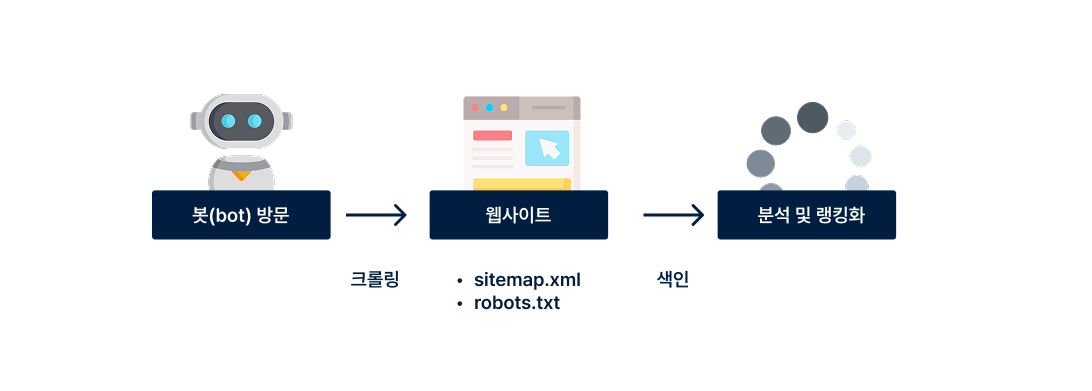
Understanding the three stages by which Google processes web pages-the flow of Crawling → Indexing → Ranking-makes it clear what actions you need to take for SEO. In this section, we looked at how SEO works to make your pages visible to users. Based on these principles, from the next section onward we will share practical SEO methods.
Technical SEO
Technical SEO is the work of laying the structural foundation of a website so that search engines can crawl the site easily and index it accurately. No matter how good your content is, it is meaningless if bots cannot read your pages properly. For this reason, it is efficient to start your SEO work by reviewing technical SEO.
1. HTTPS Setup
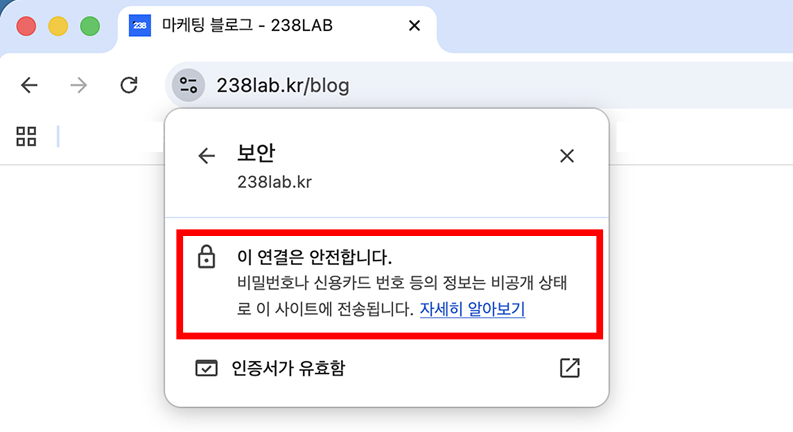
HTTPS not only protects users safely by encrypting your website's data, but is also a factor that Google officially recognizes as a 'ranking signal.' Sites with security applied are crawled and indexed more stably, and because they load without browser warnings, the user bounce rate is also lower. Since these factors ultimately have a direct impact on SEO, we recommend using HTTPS instead of HTTP on all pages.
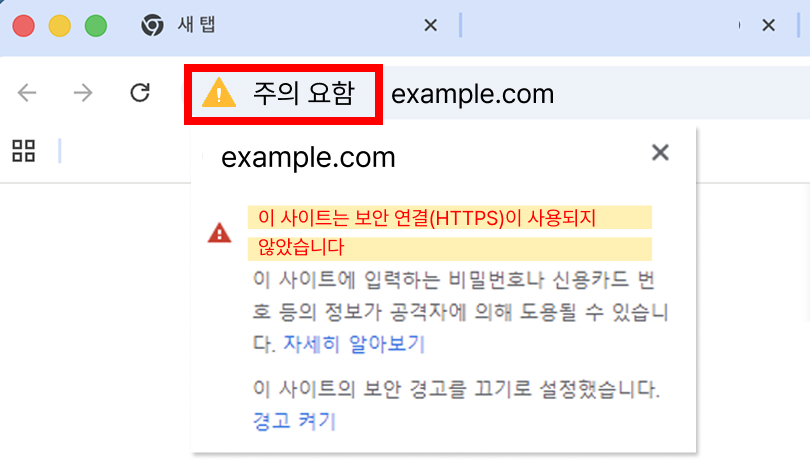
Problems when using HTTP
E.g., HTTP site → browser security warning → user bounce → 'recognized as an unsafe page due to missing security elements + recognized as an invalid page due to a high bounce rate' → negative SEO impact → no visibility
✅ How to Apply HTTPS
HTTPS can be set up by applying an SSL certificate, and most hosting and cloud services provide free or automatic issuance. After installing an SSL certificate, enable HTTPS redirection in your server settings and organize internal links and the sitemap on an HTTPS basis, so the entire site can be operated consistently over a secure connection.
2. Crawling and Indexing Optimization (robots.txt, Sitemap)
Because crawl budget is limited, it is necessary to optimize the crawling and indexing environment so that search engine bots collect important pages first. To do this, you can adjust crawling priorities by blocking the crawling of unnecessary pages with robots.txt and clearly pointing to key pages through sitemap.xml.
In the robots.txt file, clearly block pages that crawlers do not need to access (login pages, etc.) so that crawl budget is not wasted. At the same time, include all important pages in sitemap.xml without exception to send the signal that "these pages are the core of our site."
+Tip: If your site generates many parameters (URL parameters) through filtering or sorting functions, it is also important to use canonical tags and parameter policies to prevent duplicate indexing and the phenomenon where multiple pages within a single site compete for the same keyword (Keyword Cannibalization).
**Example of URL parameters

** Canonical tag: a tag that explicitly tells search engines "this URL is the original (representative) page" among multiple similar or duplicate pages.

3. Site Speed and Core Web Vitals
Site speed is a factor that affects both user experience and search ranking. Google evaluates the perceived speed in real user environments based on Core Web Vitals (LCP, CLS, INP, etc.). Indiscriminate use of large images, unused JavaScript, and heavy plugins are the most common causes of slowdowns. Improving speed through image formats (WebP, jpg, etc.) and compression, prioritized loading of important resources, cleaning up unnecessary scripts, and caching settings often reduces bounce rates and raises rankings.
Core Web Vitals (LCP, CLS, INP, etc.) can be checked in "Lighthouse" in developer mode.
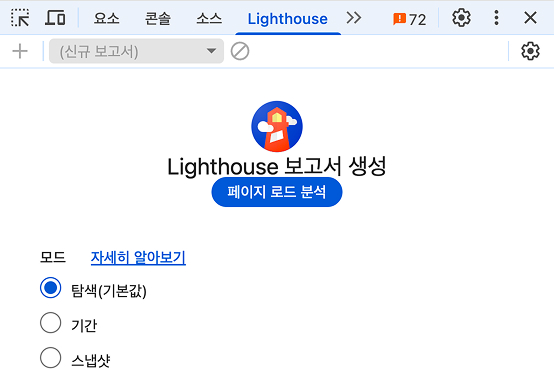
1) Windows:
- Ctrl + Shift + I → opens Developer Tools (or F12)
- Select "Lighthouse" in the top menu
2) Mac OS
- ⌘ + ⌥ + I (Command + Option + I) → open Developer Tools
- Select "Lighthouse" in the top tab
4. Site Architecture and Internal Link Structure
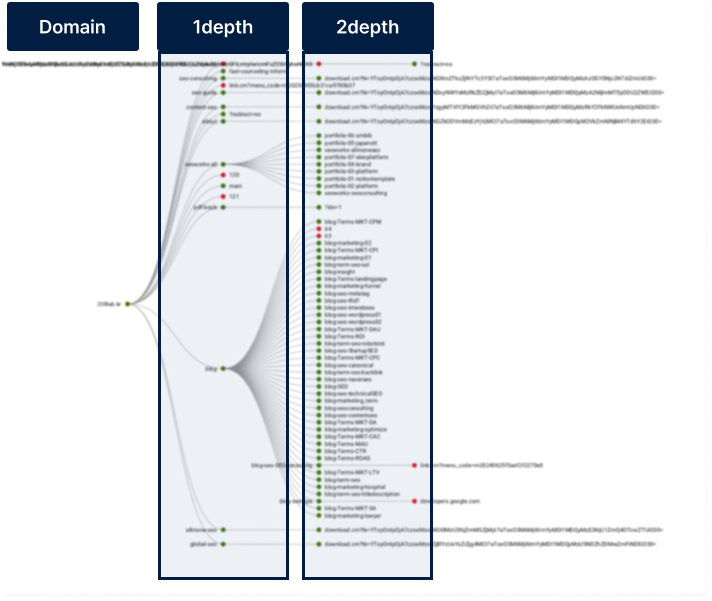
Site architecture is a kind of "site organizational chart" that shows how the pages of a site are connected. It refers to the entire site structure, including menu composition, category classification, placement of important pages, and internal link connections.
A site structure is positive for SEO when major pages can be reached within 2-3 clicks. The deeper you dig into categories, tags, and detail pages, the lower the crawling efficiency and the worse the user's browsing experience. For example, if the domain is 'example.com' and an important page is located at 'example.com/1/2,' the bot can find it at a 2-depth (= two levels deep). This means it takes more crawl time to identify the important page, and it also creates inconvenience for users who have to dig in to find the information they need. Therefore, the more important a page is, the more we recommend placing it at a shallow depth by considering the internal site hierarchy.
5. Mobile Friendliness and Responsive Design
Because Google crawls with mobile-first priority, insufficient readability and usability in the mobile environment can directly damage overall SEO performance. Therefore, it is good to align the user experience (UX) of the PC and mobile environments through responsive design. Font size, line spacing, button size, margins, menu structure, and so on must be designed so they can be used without inconvenience across PC, mobile, and, if possible, tablet environments.
On-Page SEO
On-page SEO refers to optimization work that can be set up "within the site." Even though Google interprets text by context and meaning like a human through natural language processing, it is still a bot-that is, a program-so structuring pages so that the bot can clearly read the text and content is advantageous for SEO.
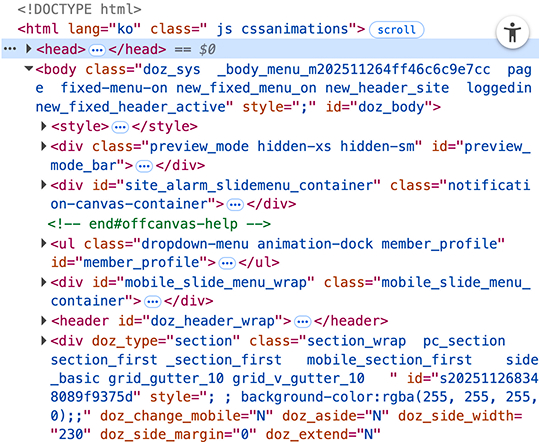
When people view a web page, they see only the rendered result, such as text and images on the screen, but an actual website is made up of code composed of HTML, CSS, and JavaScript. When a search engine bot crawls a page, it understands the page's content based on the code structure rather than the 'visible screen.' Therefore, on-page SEO is, simply put, the work of clarifying a page's content in 'code,' the language the bot can understand.
1. Title and Description Tags
The title tag <title> and the meta description <description> are best understood as the page's 'topic' and 'key description.' They are tags that tell the bot, "This page covers this content (description) about this topic (title)." For example, the title and description for a column about 'search engine optimization' can be set as follows.
- Example of title and description tags
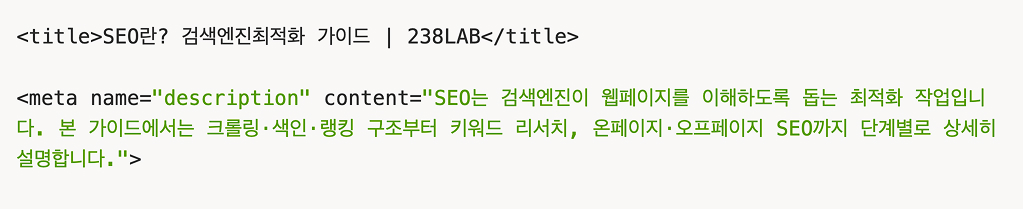
Title tags and description tags affect not only bots but also the click-through rate (CTR), since they are the title and description that users first encounter in search results. Therefore, considering the user's perspective as well, you must write titles and descriptions that satisfy the search intent behind the keyword the user searched for.

2. Heading Tags (h1, h2, h3…)
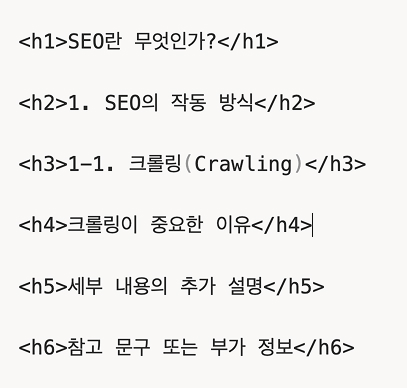
Heading tags are best understood in common terms as "titles and subtitles." So that the bot also reads it as well-structured writing, we recommend setting the <h1> tag for the title, the <h2> tag for subtitles, and the <h3> tag for the subtitles of lower-level categories.
Heading tags, along with titles and descriptions, are a core and fundamental element of on-page SEO, so it is good to set them clearly on every page. However, it is best to have only one <h1> tag on a single page. This is because it is advantageous for search engine optimization for one page to clearly contain only one topic. Rather than simply limiting the <h1> tag to one, we recommend structuring your page so it contains only one topic.
+Tip: It is fine to use heading tags down to h6, but generally you can structure only down to h3 and adjust the remaining important elements with font size or weight.
3. Image ALT Tags
Bots cannot see images the way people do. Therefore, to tell the bot what an image is and where it is used, it is good to add a text description with an image ALT tag. In addition, image ALT tags are an element that provides image descriptions not only to bots but also to people with visual impairments, and Google also evaluates this as an accessibility factor.

4. Internal Linking
Designing internal links that connect to other related internal pages, such as text anchors, also functions as an on-page SEO element. For example, this means recommending and linking to a 'robots.txt column' from an 'SEO column' page, or placing a text anchor where the text 'robots.txt' appears. Here too, excessive link insertion is not good, and about 1-2 internal links per page is appropriate. It is also good to build internal links to pages that are relevant to the topic of that page.
5. Schema Markup
Schema markup is code that expresses structured information in a standard format (such as JSON-LD) so that search engines can more accurately understand the content of a web page. Schema lets search engines clearly distinguish the page type (e.g., Article, FAQ, Product, Breadcrumb, etc.), and as a result, it increases the likelihood of being displayed in search results as rich results, such as star ratings, FAQ toggles, and breadcrumb paths.
- Example of a Product rich result

Off-Page SEO
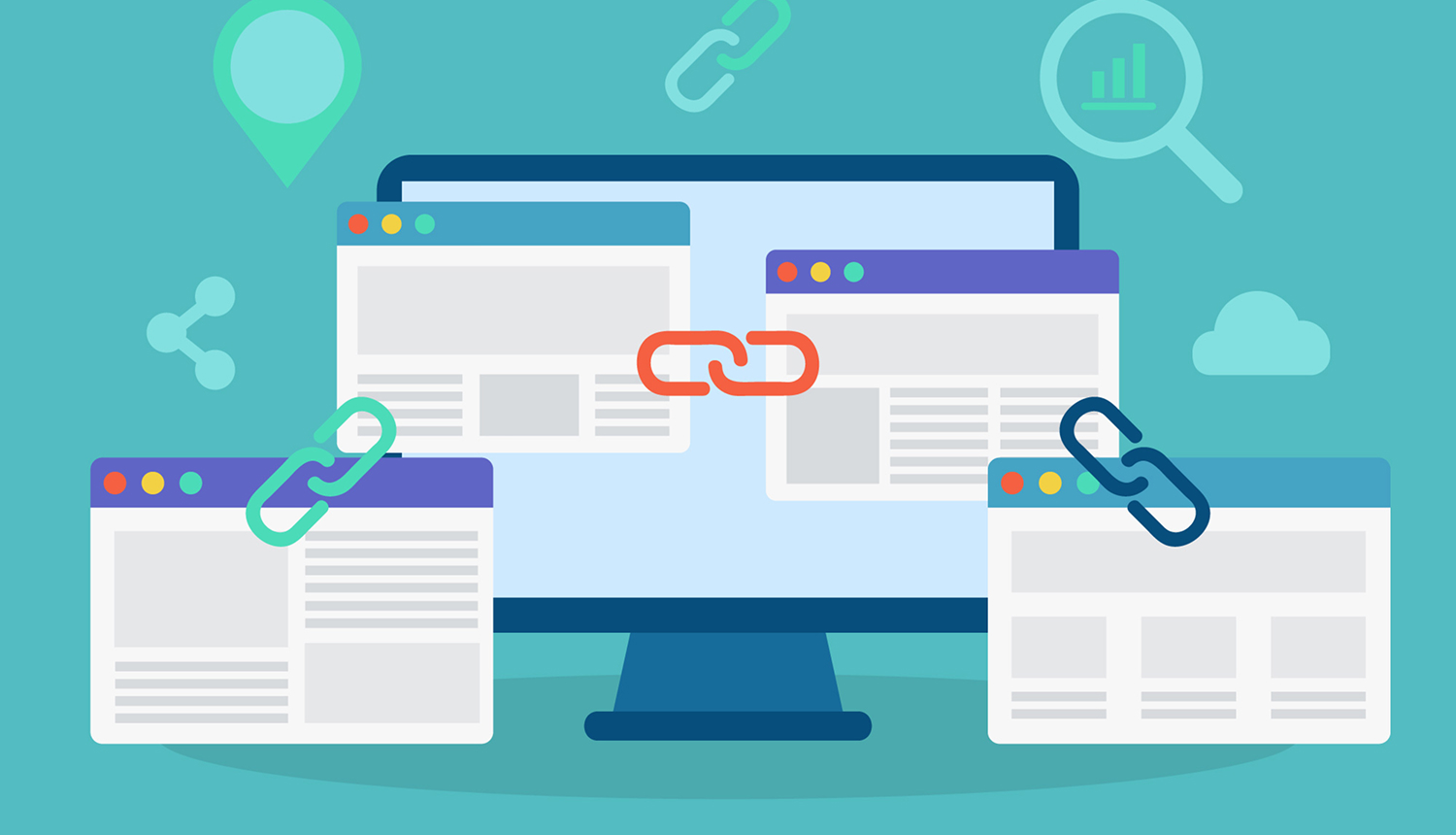
Off-page SEO is the area that evaluates a domain's credibility and authority through signals that occur outside the website. A representative element is backlinks.
1. Backlinks
Backlinks work in such a way that the more external sites recommend or cite our content, the higher our credibility becomes. This is similar to the way people come to trust information. For example, let's assume there is a cake shop. If many people rate that shop's cakes as 'delicious' and a famous magazine has named it 'Best Cake Shop of the Year,' even people who have never visited will naturally come to trust that shop. Backlinks work on the same principle.
Even for the same backlink, "where and in what context" it links from matters. Artificially generated links from sites unrelated to your topic can instead become toxic backlinks and pose a risk, while natural mentions and links from trusted sites can have a positive impact on the entire domain.
Keyword Selection
Selecting keywords of an appropriate difficulty level for your site and keywords that fit your business objectives is the key to achieving fast results with SEO. Therefore, keyword research should not simply be about finding high-volume keywords, but should be carried out as design-centered work that connects user intent with business goals. In this section, we will introduce the criteria by which you should select the right keywords.
1. Analyzing Search Intent
Search intent can be broadly divided into Informational and Transactional. For example, "what is SEO" has a strong informational intent of wanting to learn the concept and principles, while "SEO consulting cost" is closer to a transactional intent of wanting to compare services and check quotes. By checking what type of content (guides, lists, service pages, Q&A, etc.) appears at the top of the SERP for your target keyword, you can grasp what intent Google currently assigns to that query.
2. Designing Topic Clusters and Topic Maps
When doing keyword research, it is important to think in terms of topics rather than individual keywords. If you build a topic cluster by grouping subtopics such as "technical SEO, on-page SEO, keyword research, link building, structured data" around one main topic (e.g., SEO), the search engine can recognize that the site covers that field in depth.
This structure becomes the basis for internal link design and, over the long term, contributes to raising the Topical Authority of the domain. For example, looking at it from a URL structure perspective, you can build the following subtopics around a main category called "example.com/seo/."
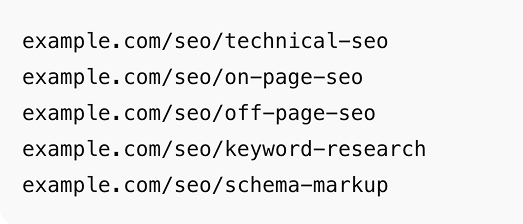
When related subtopics are placed hierarchically beneath the main topic "/seo/" in this way, the search engine can judge through the entire site structure that "this site covers the topic of SEO in depth." This kind of hierarchical structure automatically optimizes the internal link flow, allowing subpages to pass link juice to the higher category URL and reinforce its strength.
3. Leveraging Long-Tail Keywords
In the early stages, it is realistic to start with specific, low-competition long-tail keywords rather than keywords with very high search volume and fierce competition. For example, instead of "SEO," this would include longer-structured keywords such as "B2B company SEO strategy" or "e-commerce technical SEO checklist."
When gauging keyword difficulty, rather than relying solely on search volume, it is important to judge your chances of entry by comprehensively examining the scale of the sites currently ranking in the search results, their backlink counts, content quality, and more.
+ If you want to know more detailed keyword selection methods and content SEO strategies, please check the column below.
The Essence of the Strategy That Determines Content SEO Search Performance
Naver SEO vs Google SEO
This is a point many people are confused about. We often get the question, "Shouldn't doing SEO get you ranked at the top of all search engines?" But just as its name 'search engine optimization' suggests, SEO produces results on a given search engine only when you optimize separately according to how that search engine evaluates pages. Because Google, Naver, Bing, and others have different algorithm structures and evaluation criteria, you can consider yourself well-positioned for top rankings only when you have a strategy that reflects the characteristics of a specific search engine.
Each search engine has developed its own algorithm to get users to use its service more and for longer. In other words, both Google and Naver are individual companies, each pondering, "How can we get more users to use our platform more?"
Because neither Naver nor Google discloses the full structure of its algorithm, the approach to understanding SEO criteria is to synthesize official guides, patent documents, experimental verification, and user experience. That said, there are clear differences in what the two search engines consider important.
Google comprehensively evaluates various on-page, off-page, and technical factors-such as domain credibility, content clarity, fit with search intent, page structure, and external trust signals-like the SEO elements we have mainly examined in this article. In contrast, Naver has the characteristic of giving greater weight to a piece of content's topical relevance and user interaction signals (likes, comments, scroll depth, revisits, etc.) based on its C-Rank and D.I.A models. In other words, while Google evaluates centered on the quality and overall credibility of web documents, Naver more strongly reflects user response and the contextual 'relationality' of content.
Generally, among Korean users, there is a strong tendency to check informational articles on Google and reviews and testimonials (interaction- and response-oriented content) on Naver. This too lets you sense in which fields each search engine shows better content.
+ If you want to learn more about the differences between Naver SEO and Google SEO, please check the article below.
Naver SEO vs Google SEO Comparison
The Essence of SEO Is Information Design for Users
SEO is a concept that naturally formed in the process of search engines evolving their algorithms to show high-quality content to users first. Therefore, its essence lies in "providing high-quality information to users." When content is easy to read, has depth of information, and can solve a user's problem, the search engine judges that page to be a trustworthy document. Once this foundation is in place, subsequent technical SEO elements can also naturally translate into results.
Even in an environment where generative AI (GEO) and AI Overviews (AEO) are expanding, what AI ultimately references first is web documents that are structurally well organized and trustworthy. Investing in SEO now is not simply about raising today's search rankings; it is closer to building the foundation for our brand to continue being cited and chosen across the broader AI and search environment going forward. Therefore, SEO can be described not as a cost, but as a long-term investment that builds information design and brand assets together.
SEO FAQ
Q1. What is SEO?
It is the work of organizing structure and content so that search engines accurately understand the content of a page, optimizing it so that our page can be given priority visibility.
Q2. How does Google evaluate pages?
It comprehensively judges the full range of SEO factors and the depth of the content.
Q3. Why is technical SEO important?
Because even good content is unlikely to be included in search results if its structure prevents search engines from crawling and indexing it accurately. Technical SEO elements such as HTTPS, robots.txt, sitemaps, and mobile optimization act as the foundation that helps search engines read and understand pages stably.
Q4. What is the core of on-page SEO?
It is setting titles, descriptions, headings, image ALT tags, internal link structuring, and so on in line with the page's topic so that search engines can quickly understand "what this page covers."
Q5. Why is schema markup necessary?
It clearly conveys the semantic structure of a page to search engines, increasing the likelihood of being displayed as a rich result.
Q6. What role do backlinks play?
They act as a signal that content is trusted enough to be mentioned and recommended by external sites, contributing to raising domain authority. The more it is mentioned by sites highly relevant to the topic, the greater the effect.
Q7. What is the most important criterion when selecting keywords?
Rather than selecting based on search volume alone, it is good to analyze the search results landscape for that keyword to see whether it is space our website can realistically occupy, and then make a selection.
Q8. Why are topic clusters necessary?
Categorizing content by topic and structuring it hierarchically can strengthen a site's expertise (Topical Authority).
Q9. Why is mobile optimization important?
Because Google crawls with mobile-first priority, a UX optimized for the mobile environment improves user experience and works positively for SEO.
Q10. What is the essence of SEO?
It is providing information that is helpful to users. Useful content can always earn the highest trust, regardless of algorithm changes.

About the Author
Liv: SEO Consultant / Publisher
SEO specialist planner and designer responsible for SEO content strategy, website structure optimization, and search-engine-friendly UX/UI design. Former: UX/UI Design Team Lead Current: SEO Content Design Team Lead at 238lab