
What Is a Meta Tag? - The First Step in SEO
The <head> section of the HTML that makes up a web page contains tags that hold the page's core information. Among these, meta tags represent the page's key content to both search engines and users. Based on the information in meta tags, crawler bots recognize the content, classify the topic, and surface the page to users in line with their search intent. For this reason, meta tags should summarize the topic of the page content.
The text written in meta tags also appears as the page description on the search results page when users search a keyword, so it affects click-through rate (CTR). Meta tags should therefore be written as "language that clearly tells bots the topic and prompts users to click." Done well, they contribute positively to search engine optimization.
Types of Meta Tags and Their Roles
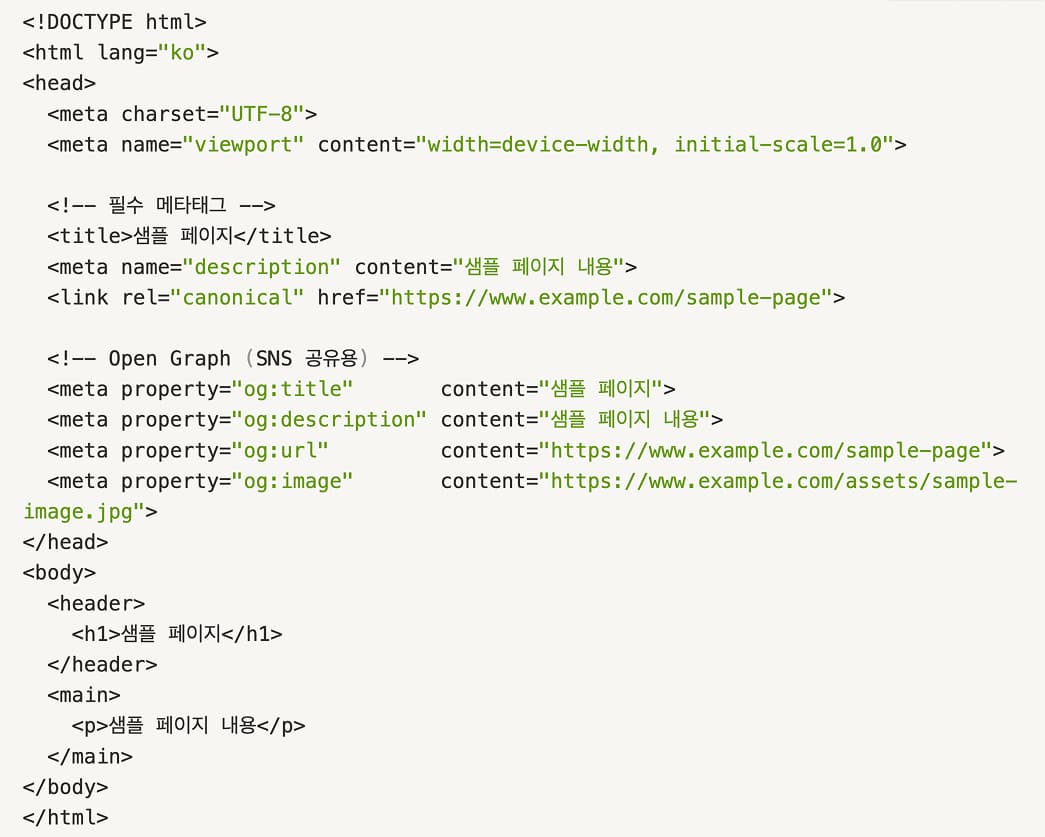
Meta tags sit in the HTML <head> and define the page's information. For those unfamiliar with HTML: HTML is the language that builds the skeleton of a web page, defining the layout structure of content, headings, paragraphs, images, links, and more. The code below is an example of an HTML <head> structure.
Now we will explain the role of each meta tag found between <head> and </head>.
1. Title Tag
The <title> element defines the page title. It is used as the title in the search result snippet, and placing core keywords near the front is generally advantageous for search visibility. However, putting keywords at the very front is not always the better choice. Rather than focusing on keyword order, write the title so it captures the page's core content and matches search intent.
2. Meta Description
The meta name="description" content="..." element is the page description shown in search results. It displays at roughly 150-160 characters, so fit the page's key description within that range. We recommend writing it in a "title-description" structure so it pairs with and complements the <title> tag.
*Google sometimes automatically rewrites the snippet based on the user's search intent or the page body content, so include core keywords and a concise summary in the meta description wherever possible.
How the <title> and <description> tags appear on the search results page
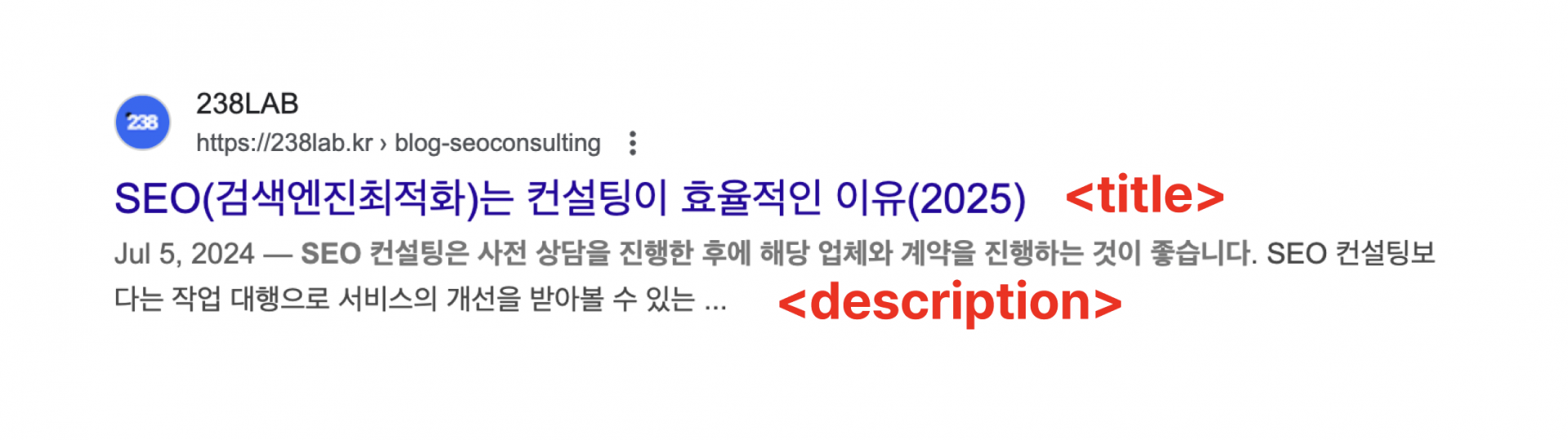
Snippet example (list-type snippet)

3. Robots Meta Tag
The <meta name="robots" content="noindex, nofollow"> tag controls how search engines index and crawl the page. In other words, this tag determines whether search engine crawler bots can access the page.
1) noindex: Exclude this page from the search engine index.
2) nofollow: Do not follow and crawl the links on this page.
In short, think of it as the crawler approving or denying two things: "whether to store this page in the index" and "whether to follow the page's links to other pages."
4. Canonical Tag
The <link rel="canonical" href="..."> tag solves duplicate content problems and guides crawler bots to index the correct page. Put simply, when multiple URLs point to identical or very similar content, the canonical tag is the code that tells search engines, "Recognize this URL as the representative page." The canonical tag prevents duplicate content, which benefits SEO.
For example, consider a shopping mall product page with several URLs carrying parameters such as ?color=red and ?color=blue but identical content. Search engines may treat these as "duplicate content," which can harm rankings or cause indexing dispersion (issue splitting). To prevent this, add the same <link rel="canonical" href="<https://www.example.com/product/123>"> to the <head> of each variant page (pages with identical body content but different parameters). The search engine then indexes only one URL and can focus its evaluation on that page.
5. Open Graph & Twitter Card
This section defines the title, image, and description shown when sharing on social media. As shown in the image below, the title, image, and description appear on sharing according to these settings.

The Relationship Between Meta Tags and SEO
Search engine optimization involves many factors. Among them, the role of meta tags can be described as "helping search engine bots index and crawl the page smoothly so it surfaces well in line with the user's search intent." The better the meta tag represents the page content, the more it contributes to SEO.
But even with strong visibility, if no 'click' occurs, the page cannot be considered high quality or one that satisfies search intent. So write copy that prompts users to click. And simply generating clicks does not automatically benefit SEO. After the click, the page content must answer the user's question or offer content good enough that they stay and read. In other words, 'dwell time' is also a factor.
This may sound complicated, but only because we approached it backward. Start from "high-quality content" and everything becomes easy. High-quality content has a clear topic, gives readers useful information, and reads well to the end, so it satisfies CTR, dwell time, and user satisfaction all at once. We mention this to make clear that "meta tag" settings are not all there is to SEO. Ultimately, SEO exists to connect good information with users. Keep this core principle in mind and put your meta tags to work for search engine optimization.

About the Author
Liv: SEO Consultant / Publisher
SEO specialist planner and designer responsible for SEO content strategy, website structure optimization, and search-engine-friendly UX/UI design. Former: UX/UI Design Team Lead Current: SEO Content Design Team Lead at 238lab