"What comes up when you search for our company in ChatGPT?" Lately, this is one of the questions marketers hear most often from executives. When you actually open it and ask, it's not unusual for a competitor's name to come up first, or for your company to appear with a service description from several years ago attached. But concluding "we don't show up in AI" or "we show up fine" from that single result is far too crude a way to check.
In our earlier post, "What Is GEO?", we established that in the AI search environment, the benchmark isn't your search ranking but whether you're cited in AI answers. So how do you check whether you're being "cited"? This post walks through, in order, a self-check procedure that any marketer can run, how to find AI-referred traffic in your website data, and how to read the results once you have them.
What does "showing up in an AI answer" actually mean?
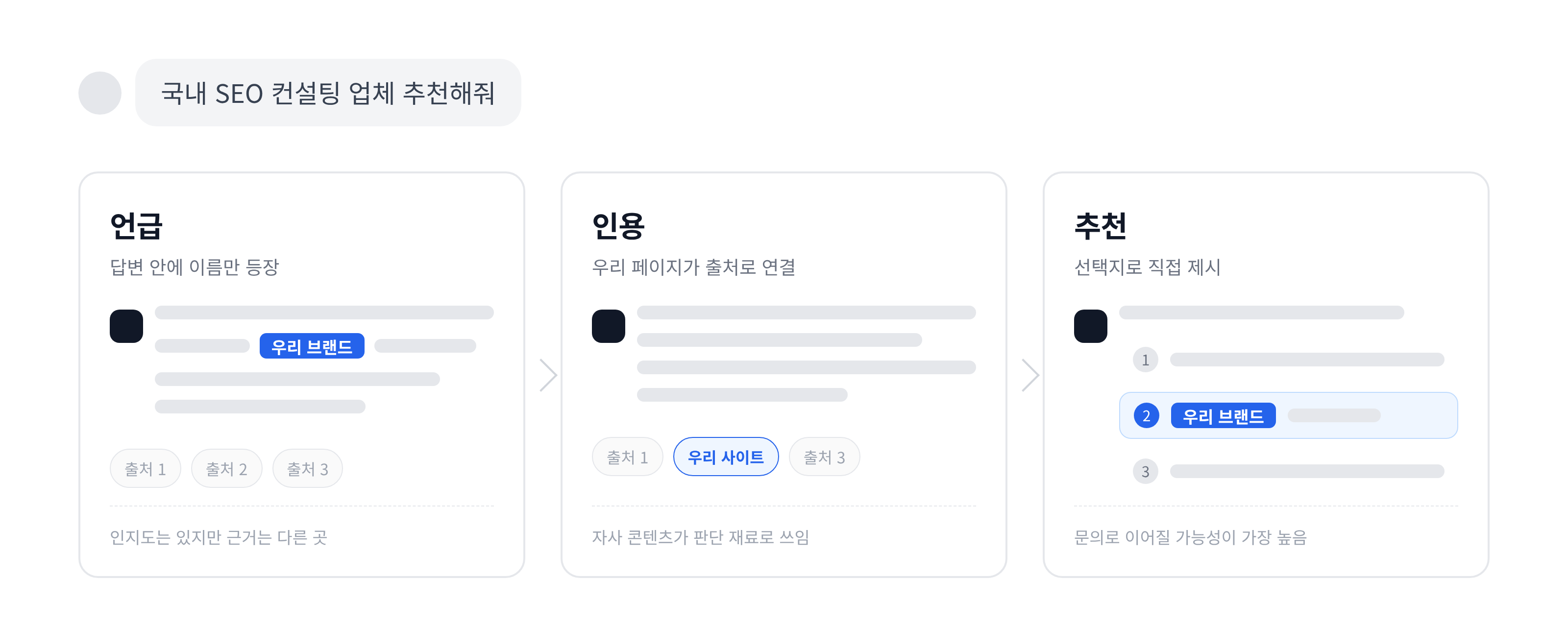
Many people think of "showing up in AI" as a single state. In reality, three different situations are mixed together, and each means something different.
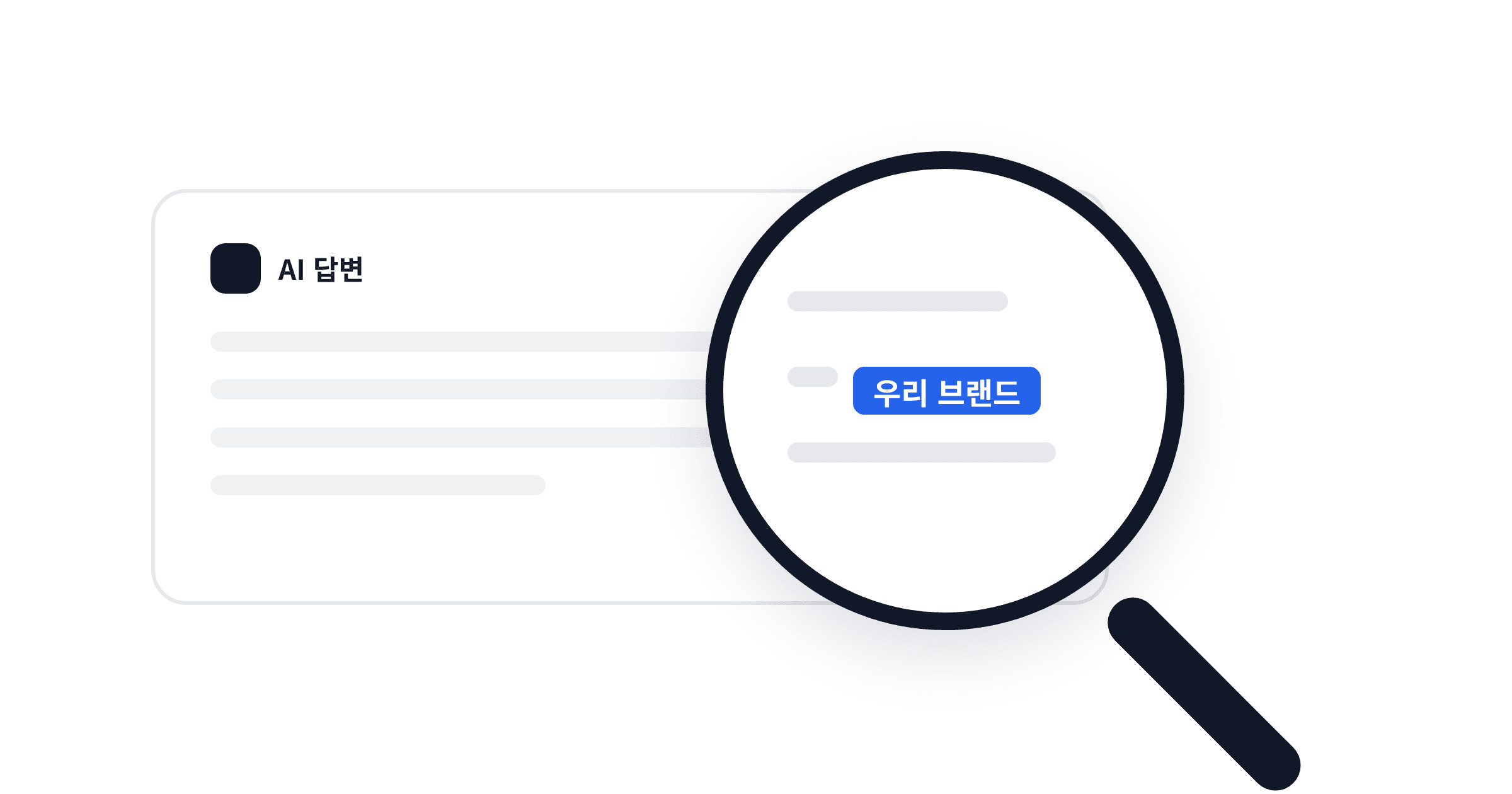
Mention
The brand name appears in the body of the AI's answer. It's the state where only the name comes up, as in "Korean SEO consulting firms include Company A, Company B, and others." It means there's some recognition, but there's no guarantee the AI used your content as its basis.
Citation
The AI attaches a page from your website as a source link supporting its answer. When GEO talks about "citation," this is generally what it means. It means your content was used as material for the AI's judgment, and actual visits can occur through that link.
Recommendation
In response to a question like "which company is good?", the AI presents your company as an option. This often appears as the cumulative result of mentions and citations, and it's the state most likely to lead to an inquiry.
One more thing to keep in mind: AI answers aren't fixed results like search rankings. Ask the same question three times on the same day and the answer can change, and results may also shift depending on the usage history of the logged-in account. Treating a single result as "our ranking" makes it easy to misjudge. So how do you check results this unstable in a way you can trust?
How do you check it yourself?
The range of what a marketer can check without any special tools is wider than you'd think. But rather than "typing in our company name once," it's better to decide in advance on the types of questions, the platforms, and the number of repetitions, and then repeat the same procedure each time.
Split questions into three types
Questions that ask about the brand name directly, questions that ask about the category your company belongs to, and questions that ask about the problem your company solves. Brand-name questions show how the AI describes your company; category and problem questions show whether your company appears as an option. Since what customers actually ask AI is most often the third type, appearing in the first two means little if you don't appear in the third.
| Question type | Example (for an SEO consulting firm) | What to check |
|---|---|---|
| Brand name | What kind of company is 238LAB? | Whether the description is accurate and free of outdated information |
| Category | Can you recommend SEO consulting firms in Korea? | Whether your company is among the options, and in what position |
| Problem solving | My website isn't being indexed by Google. What should I do? | Whether your content is attached as a source |
Each platform works differently
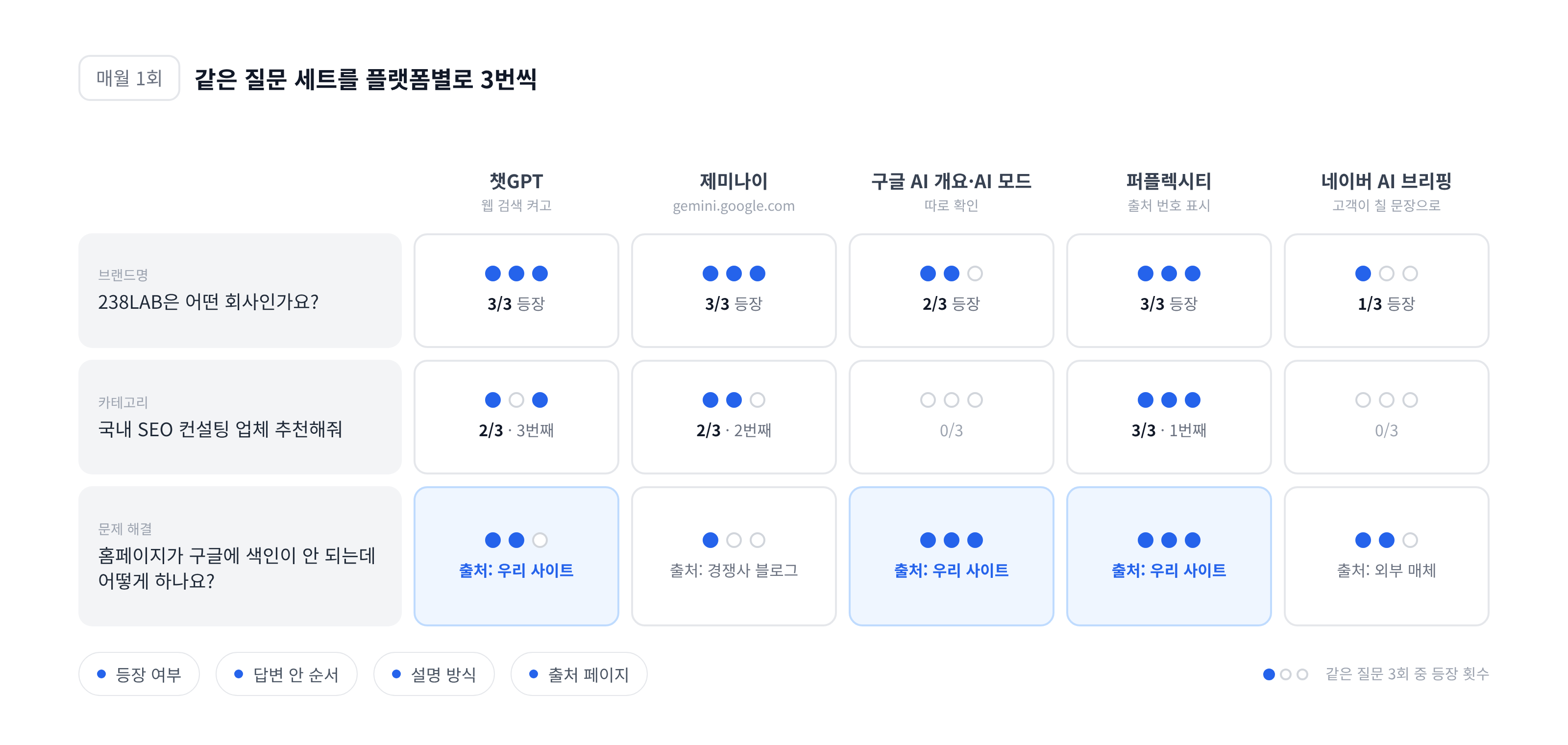
In ChatGPT, source links only appear when you ask with the web search feature turned on. With it off, the model answers from training data alone, so recent content isn't reflected. Check Gemini at gemini.google.com, and look at Google Search's AI Overviews and AI Mode separately, because even though it's all Google, the sources shown can differ. Perplexity numbers its sources on every answer, which makes it the easiest place to confirm citations. For Naver, check whether AI Briefing appears in the Naver app or mobile search, but since it mainly shows for queries about how-tos, recommendations, comparisons, and concepts rather than brand-name searches, it's best to search with the sentences customers would actually type.
Ask the same question several times, ideally in different environments
Since answers can vary from session to session, ask the same question at least three times, and because the logged-in account's usage history may influence results, check once more in an incognito window or a different account. Recording how many times out of three your company appeared gives you far more useful data than a simple "shows up / doesn't show up."
Record four things
Whether you appeared, your position within the answer, how your company was described, and which site and which article was attached as the source. The last item matters most. If your company is mentioned but the source is a competitor's blog or an external outlet, it means the AI knows about you but isn't using your site as its evidence.
This isn't a one-time task. Research shows that the sources AI cites change substantially from month to month, so we recommend repeating the check once a month with the same question set. Free AI visibility tools from Semrush or Ahrefs can reduce the manual workload as a supplement, but they have limits when it comes to covering Korean-language questions and the Naver environment.
That said, checking whether you appear in AI answers and checking whether people actually arrived after seeing those answers are separate matters. So where can you see the visitors who came through AI?
Where do you see visitors who came through AI?
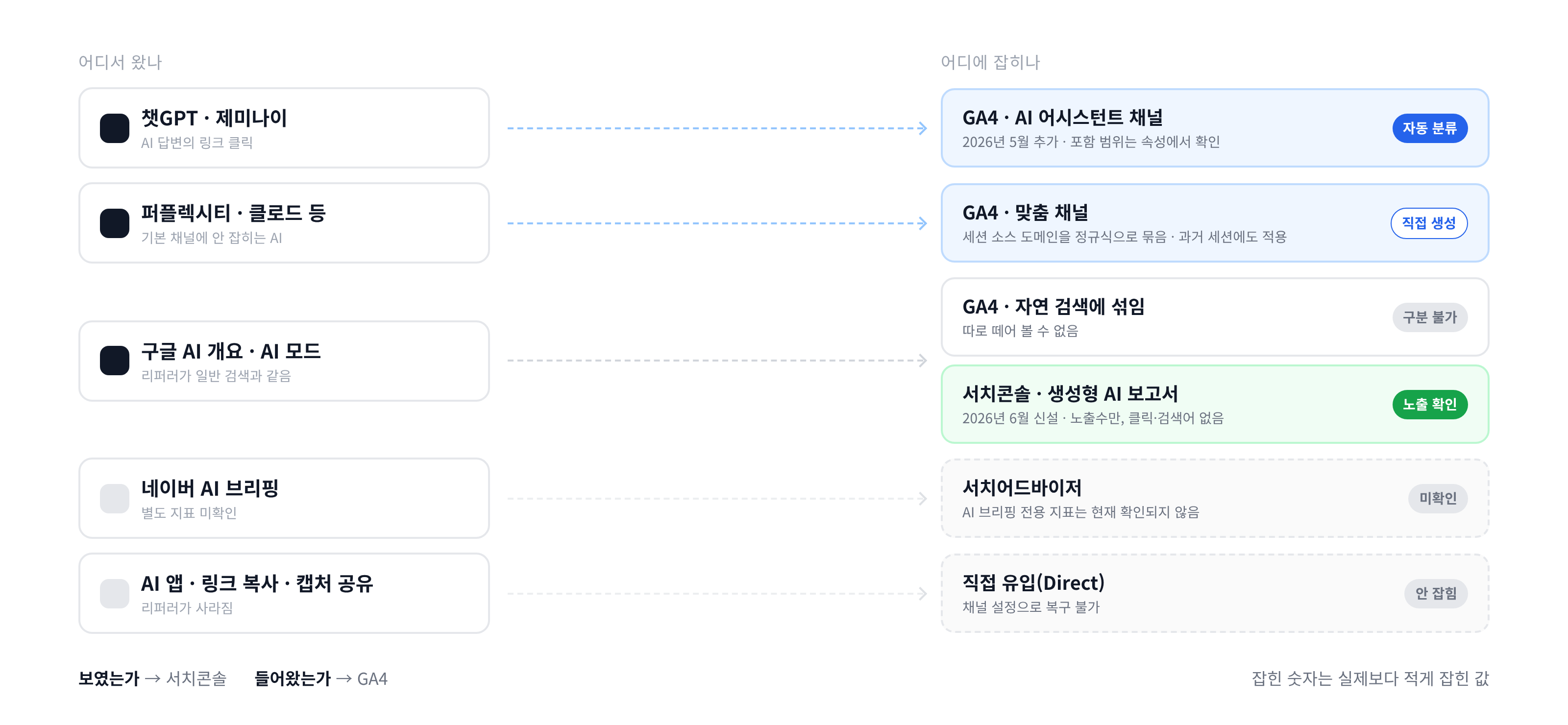
If your link was attached to an AI answer, the visits from clicking that link are recorded in your website data. But where they show up depends on which AI they came through.
The AI Assistants channel in Google Analytics (GA4)
Since May 2026, GA4 has included a default channel called AI Assistants, so visits coming from AI services like ChatGPT and Gemini are shown separately from general Referral traffic. You can check the channel group under Reports → Acquisition → Traffic acquisition. However, Google hasn't published the full list of which AI services are included in this channel, and it may change, so it's best to check session sources directly in your own property. Data from before the channel was added isn't reclassified retroactively, so past periods remain mixed into referral traffic.
For AI services that fall through, build your own channel
For AI services that aren't captured by the default channel, one option is to go to Admin → Data display → Channel groups and create a custom channel that groups domains like chatgpt.com, perplexity.ai, claude.ai, and gemini.google.com by session source using a regular expression. Channels created this way also apply to past sessions, so you can trace trends backward.
Google AI Overviews and AI Mode are mixed into search traffic
Clicks that come through AI Overviews and AI Mode within Google's search results carry the same referrer as regular search, so GA4 classifies them as Organic Search. In other words, they can't be separated out. Instead, Search Console added a generative AI performance report in June 2026, which lets you see how many times your pages were shown in AI Overviews and AI Mode, broken down by page, country, and device. It's currently impression-focused, and click or query-level data is understood not to be provided. In short: check "was it shown?" in Search Console, and "did they come in?" in GA4.
Some cases don't show up in the data at all
When a link is opened from within an AI app, the referrer is sometimes dropped and the visit is recorded as Direct. The same goes for cases where someone copies the URL from an answer and pastes it into a new tab, or receives a screenshot of the answer shared by someone else. For Naver AI Briefing, no separate metric in Search Advisor has been confirmed so far. So it's correct to treat the AI-referred traffic captured in your data as an undercount of the real figure.
At this point you have two kinds of data in hand: the appearance records you checked yourself, and the AI-referred traffic recorded on your website. So how should you read these numbers?
How should you read the results?
The results generally fall into one of four patterns. Each pattern has a different cause and a different next step.
| Pattern | Meaning | Next step |
|---|---|---|
| No mention, no citation | The AI isn't connecting your company with the topic | Start by checking whether you have content that answers problem-solving questions, and whether it's indexed |
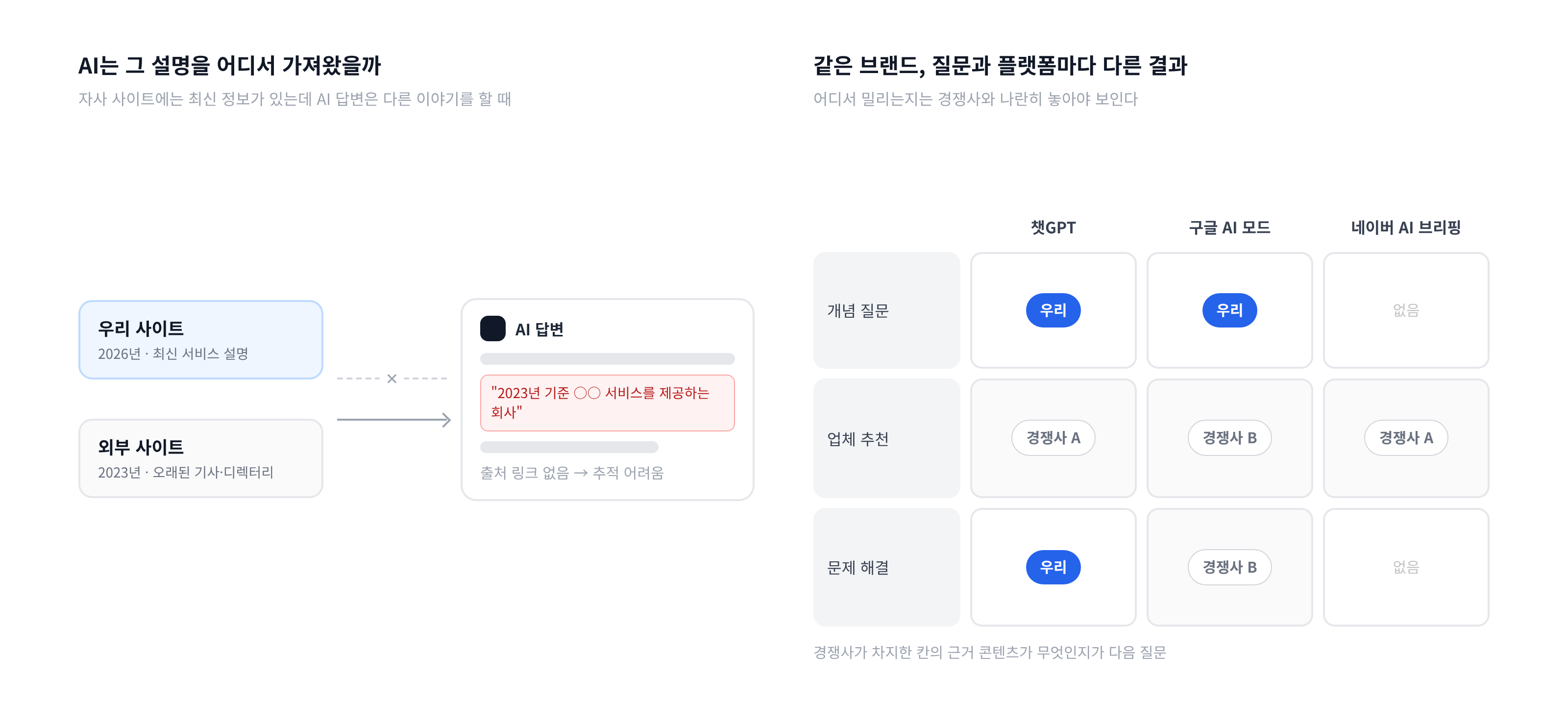
| Mentioned, but the source is a competitor or external site | The AI knows about you but takes its evidence from elsewhere | Look at what the external pages the AI cited cover, and build supporting content of the same caliber on your own site |
| Cited, but the description is wrong or outdated | Your company's information differs from site to site online, or old information remains | Trace which source the AI used to build that description and fix that information first |
| Appears only for certain question types | For example, shows up for concept questions but is missing from recommendation questions | Check for case study and comparison content that addresses the missing question types |
The third pattern is the one that catches marketers most off guard. If your site has the latest information but the AI is saying something else, it means the AI trusts information from somewhere else more than it trusts your site. Finding out which source is the origin of that description means following the citation links in the answer one by one, and if the answer has no citation links, tracing it is difficult in itself.
Which of the four patterns you fall into also varies by question set and platform. You might be cited in ChatGPT but entirely absent from Naver AI Briefing, or appear for concept questions while only competitors appear for vendor recommendation questions. Where these differences come from, and what content competitors are using to hold those positions, is hard to tell from your own check records alone. It only becomes visible when you compare against competitors' citation status side by side.
Closing
Checking whether you appear in AI answers isn't a matter of running one search. It's a matter of defining a question set, checking repeatedly, and matching the results against your website data. Asking brand-name, category, and problem-solving questions three times each per platform, recording appearances and sources, and checking AI-referred impressions and traffic in GA4 and Search Console are all things a marketer can do directly.
If you check and find that your company is mentioned but the source is always another site, or that the AI's picture of your company doesn't match the present, it's worth finding out where the AI is getting that information before writing more content. If it's hard to judge which questions competitors are occupying and what content underpins their position, 238LAB's GEO diagnostic can help you review your citation status by platform and your position relative to competitors.

About the Author
Aiden: SEO & GEO Consultant / Marketing
From venture investment to M&A advisory, I design digital growth across the entire corporate lifecycle. As an SEO consultant at 238lab, I focus on building sustainable, data-driven traffic structures. Former Marketing Lead at a venture and startup management consulting firm Former Digital Strategy Team Lead at a corporate finance advisory firm Current Head of Digital Strategy at 238lab