
What Is Crawl Budget?
Just because pages exist on your website does not mean Google visits every URL at the same frequency.
Crawl budget is the range of URLs that Googlebot can crawl on a site — and actually intends to crawl.
Google explains it in two parts.
Crawl capacity limit
The level of requests Googlebot can make without putting excessive load on your server.
If server responses are stable and fast, Googlebot has room to process more requests. Conversely, when response times grow or 5xx server errors and 429 Too Many Requests repeat, Google may lower its crawl intensity to protect the server.
Crawl demand
This relates to how much Google judges a URL needs to be revisited.
Page change frequency, content uniqueness, the total URL space discovered on the site, and page importance all play a role. Crawl demand can also shift in situations where Google must re-map the site structure, such as site migrations or large-scale URL changes.
That is why understanding crawl budget simply as "how many times Googlebot visited today" makes it easy to miss the real problem.
For example, if daily crawl requests are high but mostly concentrated on sort-order URLs or duplicate filter URLs, discovery of new products and core content can actually slow down.
Crawl budget optimization is not about maximizing Googlebot visits — it is closer to organizing your URL structure so Google can efficiently discover and revisit the URLs that matter.
Not Every Site Needs Crawl Budget Optimization
If a corporate website with a few hundred pages sees slow indexing, crawl budget should not be the first suspect.
Google frames its crawl budget guidance mainly around sites with many pages and frequent content changes.
| Site type | When crawl budget management matters |
|---|---|
| Very large sites | Around 1 million+ unique pages with regularly changing content |
| Mid-to-large dynamic sites | Around 10,000+ unique pages that change rapidly every day |
| Sites with heavy indexing delays | A large share of "Discovered – currently not indexed" URLs in Search Console |
Treat these numbers as reference ranges for judging site size and change frequency rather than absolute thresholds.
Crawl budget problems arise most easily on sites where the number of generatable URLs far exceeds the number of actual content pages — e-commerce, job boards, real estate, and travel platforms.
Even with 50,000 products, if brand, price, color, stock, and sort conditions are each reflected in the URL, the addresses Google discovers can balloon into the hundreds of thousands or millions.
Conversely, even with many URLs, if content changes little and canonicals, internal links, sitemaps, and URL structure are managed consistently, crawl budget may not be the first problem to solve.
What smaller sites should check first
For a typical site of hundreds to thousands of pages, check these before crawl budget:
- Is the page set to noindex?
- Does the canonical point to a different URL?
- Are internal links broken, making important pages hard to discover?
- Does the actual body content render properly after JavaScript execution?
- Does the content overlap excessively with other pages?
In particular, if Search Console shows "Crawled – currently not indexed," Google has already fetched the URL.
In that case, the correct diagnostic order is to look at content quality, duplication, canonicals, rendering output, and page uniqueness before suspecting insufficient crawling.
Diagnosing Crawl Budget Issues in Search Console
Crawl budget cannot be judged from total crawl requests alone.
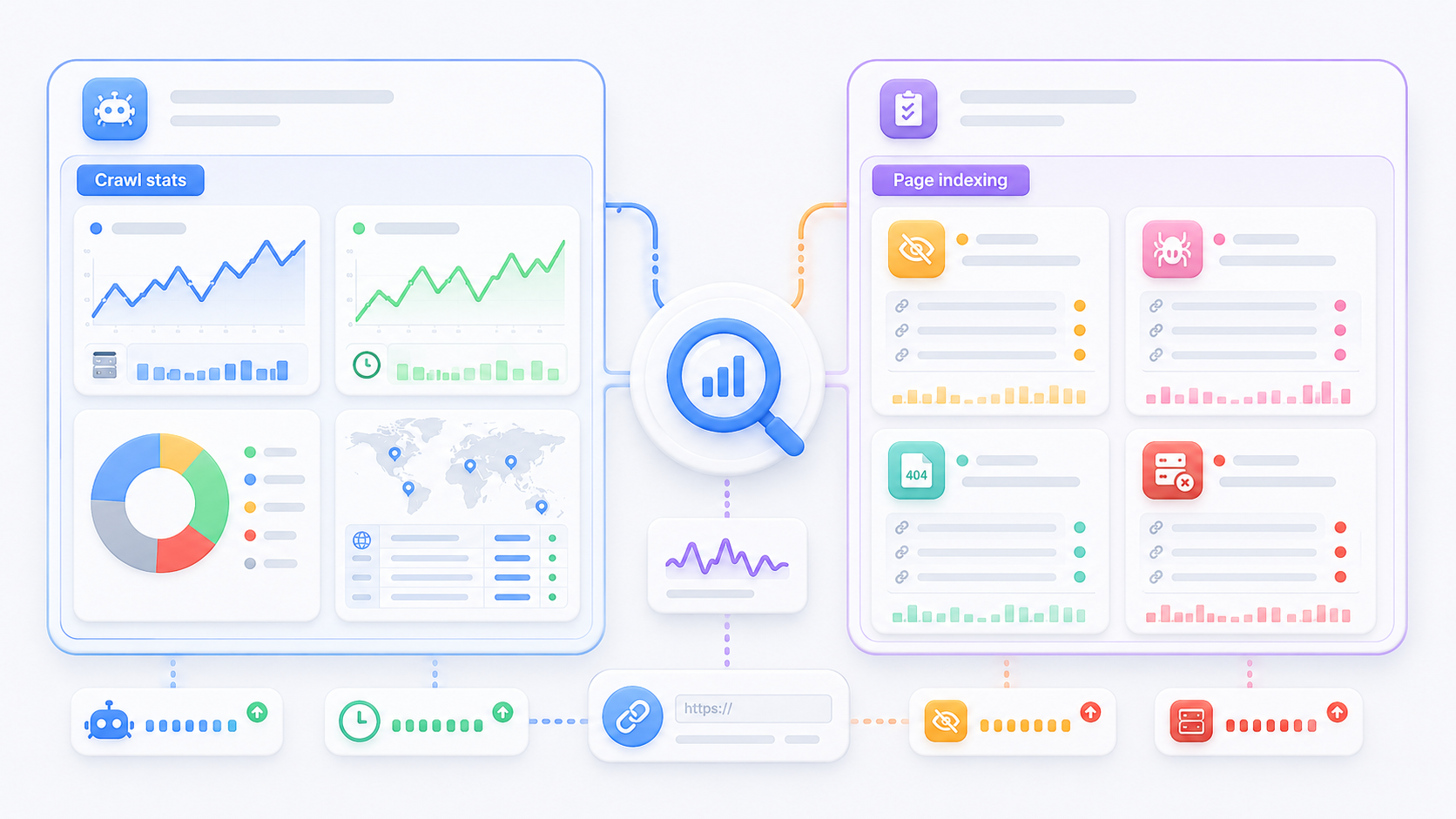
You need to read Google Search Console's Crawl Stats and the Page Indexing report together.
Crawl Stats shows how Googlebot accessed the site; the Page Indexing report shows how the results were handled at the URL level.
What to check in Crawl Stats
Before total request counts, check the state of those requests.
Has average response time suddenly increased? Are 5xx responses growing? Are 429 responses repeating? Are requests spiking abnormally for a specific host or Googlebot type?
For instance, if crawl requests rise while response times worsen and 5xx errors climb, that is hard to read as a positive crawling increase.
First verify whether the server or application is failing to handle Googlebot requests reliably.
Why to read it alongside the Page Indexing report
| Search Console status | What to check first |
|---|---|
| Discovered – currently not indexed | Internal links, sitemap, URL explosion, server accessibility, discovery paths to key URLs |
| Crawled – currently not indexed | Content quality, duplication, canonicals, rendering, page uniqueness |
| Soft 404 | Empty result pages, deleted pages, status code handling |
| Server errors | 5xx, 429, server logs, CDN/WAF policies |
"Discovered – currently not indexed" means Google knows the URL but has not crawled it yet.
Here, do not just confirm the URL is in the sitemap — verify it can actually be discovered through key categories and internal links.
"Crawled – currently not indexed," in contrast, means Googlebot has already fetched the content, so approaching it purely as a crawl budget problem sends the diagnosis in the wrong direction.
Classify Which URLs Googlebot Is Crawling
Jumping straight into robots.txt edits is not the right way to start crawl budget optimization.
First, divide all URLs Google can discover into types.
For an online store, the typical suspects are sort URLs like ?sort=price_asc, color/brand filter URLs, tracking parameters such as UTM, session IDs, internal search results, and filter combinations.
The issue is not that parameters exist. It is that when addresses showing identical or near-identical screens keep appearing in internal links, and the number of combinations grows, the URL space Googlebot explores expands unnecessarily.
That does not mean all parameter URLs must be removed.
A filter page like "specific brand + specific product group" with real search demand and a unique product list can operate as an independent SEO landing page.
Conversely, pages that differ only in sort order, return empty results, or change address per session rarely need to remain in search results.
So judge URLs by search value and page role, not by their address.
| Criterion | What to judge |
|---|---|
| Search demand | Do real search users look for this combination? |
| Content uniqueness | Does it provide products or information distinct from other pages? |
| Conversion value | Does traffic lead to purchases, inquiries, or other value? |
| Internal links | Is it an actual destination within the site? |
| Indexing need | Should it stand on its own in Google search results? |
| Generation scale | Do combinations make the URL count effectively infinite? |
Separating strategic from non-strategic URLs with these criteria is what lets you choose the right treatment — canonical, robots.txt, or noindex — afterward.
Parameter URLs Require Different Treatments by Purpose
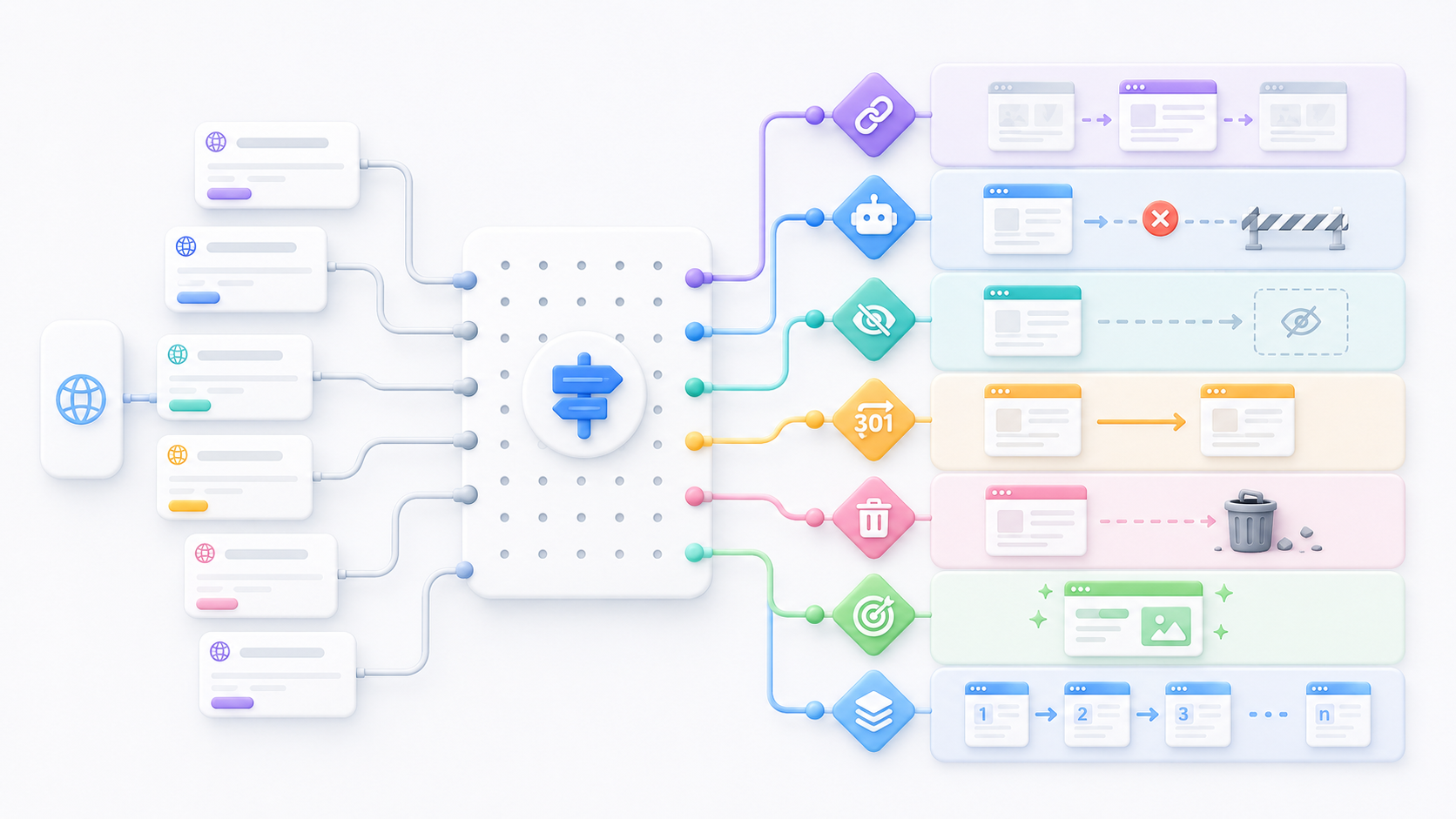
The most common mistake here is using canonical, robots.txt, and noindex interchangeably. Each tag has a distinct job.
canonical
A canonical is a signal telling Google which URL should be treated as the representative among duplicate or highly similar URLs.
If URLs differing only by sort order or tracking parameters serve identical content, designate the representative URL as canonical.
A frequent misunderstanding is treating the canonical as a crawl-blocking command. It is only a representative-URL declaration — it does not block indexing.
Googlebot can still access the URL once discovered, so it is important to use the representative URL consistently in internal links and XML sitemaps too.
robots.txt
robots.txt controls crawlers so they do not request specific URLs or paths.
For endlessly generated URLs like filter combinations or internal search results that Google has no reason to crawl, robots.txt is worth considering.
But never block filter landing pages with genuine search value under the same rule.
noindex
Noindex instructs Google to keep a page out of search results. Use it for pages users need to access but that have no reason to appear in search — a customer's account page is a typical example.
404/410 and 301
Use 404 or 410 for genuinely deleted content.
If a clear replacement URL exists, apply a 301 redirect. After a site renewal, skipping 301s makes it very likely the existing domain authority evaporates.
Redirecting all deleted pages to the homepage, or bulk-redirecting them to unrelated addresses, is not appropriate.
| URL situation | Treatment to consider first |
|---|---|
| Sort/tracking URLs of identical content | canonical + internal link cleanup |
| Endlessly generated non-strategic filter URLs | URL generation & internal link rules + consider robots.txt |
| User access needed, search visibility not | noindex |
| Genuinely deleted pages | 404 or 410 |
| A clear replacement page exists | 301 |
| Filter pages with search demand | Keep as independent strategic landing pages |
| Normal pagination | Keep own URLs and navigation links |
Why Pagination Should Not Be Treated as Duplicate by Default
Pagination often gets lumped in with parameter URLs as cleanup targets, but its role is different.
If each page shows a distinct list of products or content and serves as the real navigation path to the next set, crawlers must be able to access it.
Say 100 products are split into 5 pages of 20. Canonicalizing every page to page one, or blocking all the later pages, weakens the internal link paths through which those later products are discovered.
For infinite scroll as well, providing URLs and link structures Google can access is more reliable than loading content purely through JavaScript. Mapping one piece of content to one URL is fundamental to SEO.
Making Important URLs Explicit Through Internal Links
Once unnecessary URLs are cleaned up, the next step is making important URLs easier to discover.
Link standard category URLs from the main menu and category navigation, and use canonical product URLs — free of tracking parameters and session values — in product listings.
The same goes for related-content and recommended-product modules.
Conversely, if every product card and filter button keeps generating sort/filter parameter URLs, the URL space Googlebot explores widens for no benefit.
Filter landing pages with verified search demand can be the exception, receiving natural internal links from key categories and related pages. In other words, internal link optimization is not about adding more links — it is about designing which URLs Googlebot repeatedly discovers on your site.
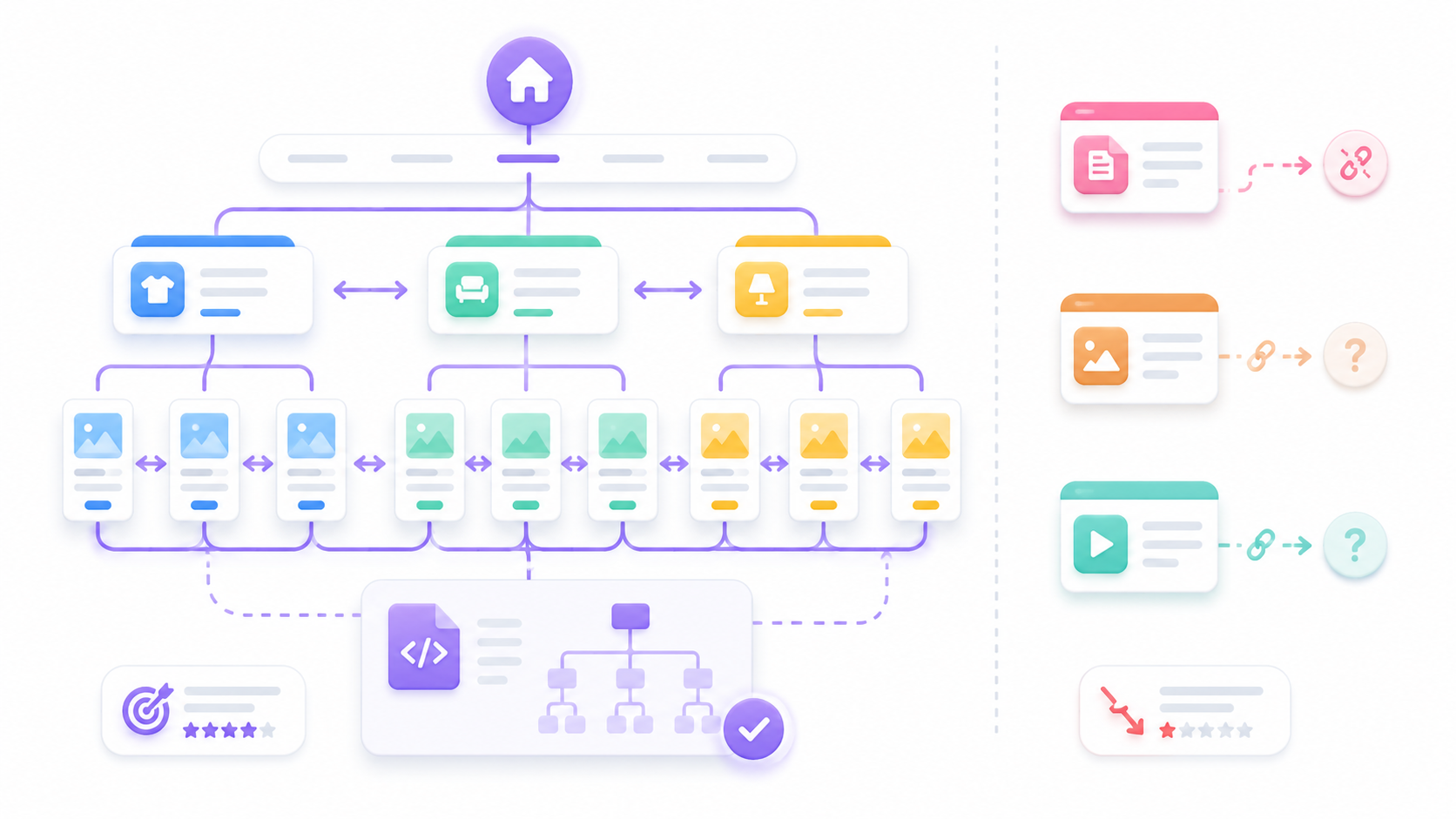
Register Canonical, Indexable URLs in the XML Sitemap
It is tempting to treat the XML sitemap as a list of every URL on the site, but for SEO a different approach works better.
Build it around the canonical URLs you want Google to discover and crawl.
In general, include indexable URLs that self-canonicalize, and exclude 404/410 pages, redirecting URLs, noindex URLs, and non-search URLs such as sessions or previews.
If internal links point to URL A as the key page, the sitemap submits URL B, and the canonical designates URL C, the conflicting signals make representative-URL management a mess.
Update lastmod only on real changes
lastmod conveys when a page was last meaningfully modified.
Update it when something that can affect search results changes — body content, product price or stock, list composition.
Avoid stamping every URL with the current time daily just because a batch job ran.
Also Check Pages with Broken Internal Links
Some pages exist in the sitemap but receive no links from anywhere on the site.
Typical cases: new products, content dropped during category restructures, and landing pages left over from old URL structures.
Even if these pages exist normally and return a 200 status code, without internal navigation paths they are hard for both Googlebot and users to find.
If a page is worth indexing, build a structure where it receives meaningful internal links.
Comparing URLs found by a site crawl, URLs in the XML sitemap, and URLs Googlebot requested in server logs makes orphaned pages easy to spot.
If a URL exists in the sitemap but never appears in an internal crawl, review the internal link structure. Conversely, if a URL appears in neither the sitemap nor internal links yet Googlebot keeps requesting it in server logs, suspect stale external links, redirects, or parameter URL sprawl.
Unstable Server Responses Limit the Benefit of URL Cleanup
Crawl budget management is a complex area — organizing the URL structure alone does not fix the entire crawl environment.
Even when Googlebot discovers your important URLs, if the server cannot handle the requests quickly and reliably, crawl capacity itself gets constrained.
When 5xx errors increase
Check for application errors, database load, deployment problems, and external API failures.
Do not stop at overall averages — identify which URL types produce the errors.
If product detail pages are fine but errors occur only on filter-combination URLs, conditional queries or the cache architecture may be the cause.
When 429 responses occur
Review CDN, WAF, rate limits, and origin-server throttling policies.
Check whether a policy is treating Googlebot the same as aggressive scraper bots.
That said, verify genuine Googlebot identity rather than allowlisting on the User-Agent string alone.
Use 304 for unchanged pages
If a page has not changed since the last crawl, a 304 Not Modified response can be used.
This does not mean excluding the page from the index — it tells Google to reuse its cache instead of re-downloading the full content, saving server resources and bandwidth.
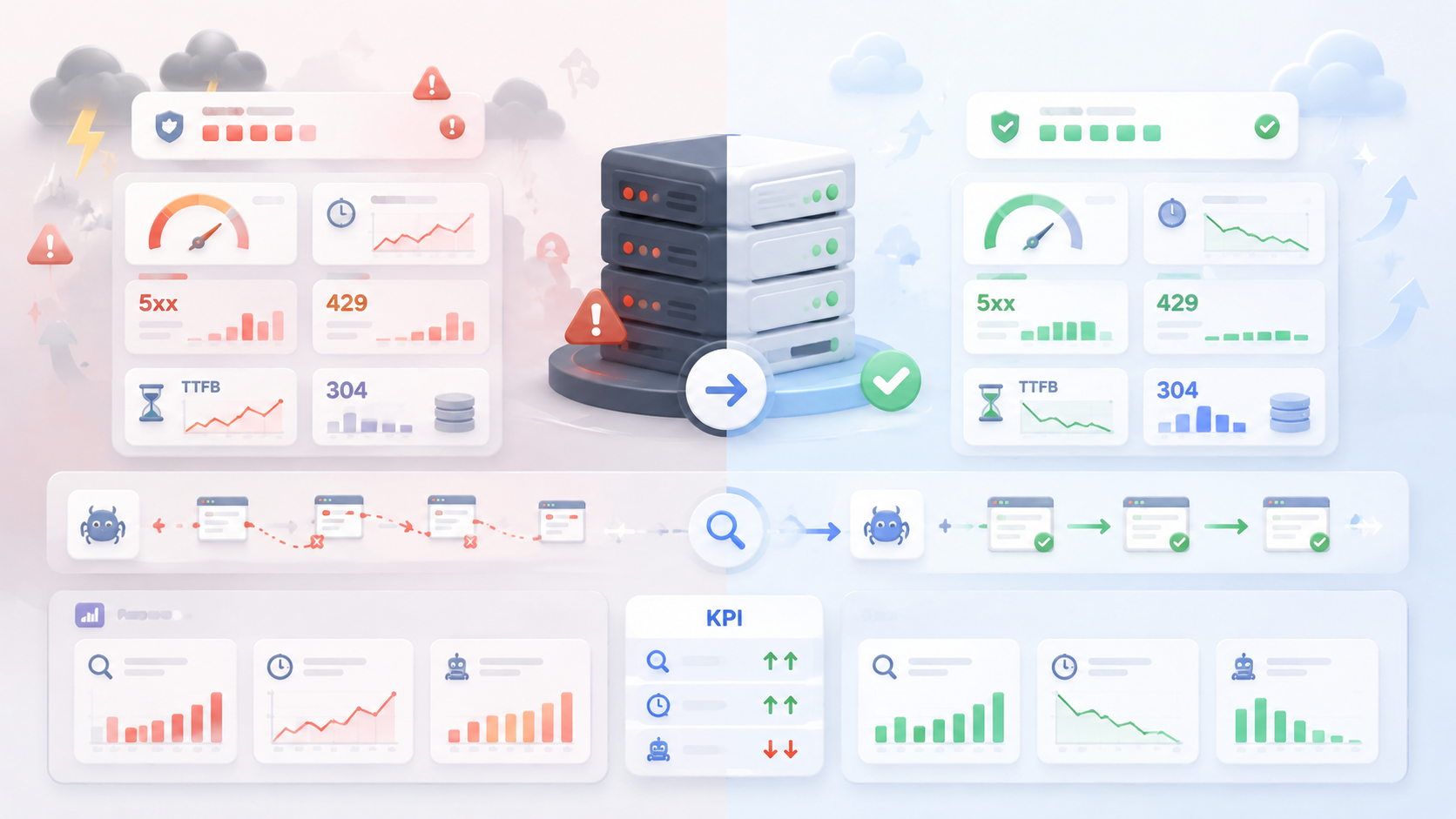
Judge Optimization by Key URLs, Not Request Counts
An increase in total crawl requests does not mean the optimization succeeded.
Right after a site migration or URL rule change, crawl requests can spike temporarily while Google maps the new structure.
Conversely, if crawling of unnecessary sort/session/filter URLs drops and new products and core content get discovered faster, a lower total request count is actually the better outcome.
So compare before and after using the same URL-type segmentation.
| Area | Metrics |
|---|---|
| Key URLs | Index rate and exclusion reasons |
| New/updated pages | Discovery and recrawl flow |
| Indexing delays | Share of key URLs in "Discovered – currently not indexed" |
| Server | 5xx, 429, average response time |
| Sitemap | Match between submitted canonical URLs and actually indexed URLs |
| Non-strategic URLs | Reduced crawling of parameter/search/sort URLs |
| Internal links | Structural changes in exposure of key vs. non-key URLs |
Recording deployment dates and change details before crawl budget work is critical.
If you modify robots.txt, canonicals, the sitemap, internal links, and CDN/WAF settings all at once without records, you cannot tell which change moved the crawl stats later.
Crawl Budget FAQ
1. Does crawl budget directly affect rankings?
Crawl request volume itself does not raise rankings. But a page must be discovered and crawled before it can proceed to indexing and ranking evaluation. So treat crawl budget not as a ranking factor but as the technical SEO discipline that ensures important content on large sites reaches the search systems properly.
2. Do small sites need to manage crawl budget?
For most small sites, checking index blocking, canonicals, content duplication, internal links, and rendering errors first is more productive than crawl budget.
3. Does blocking in robots.txt remove a page from search results?
It is a blocking directive, but if the page is already indexed, removal can take a long time. robots.txt controls crawling. If Google already knows the URL through external links, the URL itself can still appear in search results even though the content cannot be crawled.
4. Can robots.txt and noindex be used together?
If you use noindex to remove a page from search results, Googlebot must be able to read the page. Blocking access via robots.txt prevents the noindex directive from being seen, so avoid applying both settings for the same purpose.
5. Should all parameter URLs be blocked?
No. If real search demand exists and the page provides a product or content list distinct from other pages, it can operate as a strategic landing page. Conversely, URLs with little independent search value and ever-growing combinations — sorting, tracking, sessions, empty search results — are the ones to manage for crawling and indexing.
URL Inventory Cleanup Sequence for Crawl Budget Optimization
In practice, this order is the most efficient:
- Define key URLs first. Separate core categories, products, content, and filter landing pages with verified search demand.
- Record a Search Console baseline. Log index status by URL type, crawl requests, 5xx/429, and response times.
- Build a URL inventory. Classify filters, sorting, search, pagination, sessions, tracking parameters, and deleted URLs by pattern.
- Decide treatments matched to each URL's role. Apply canonical, robots.txt, noindex, 301, and 404/410 for their intended purposes.
- Align internal links and the sitemap around canonical URLs.
- Review server logs and CDN/WAF. Check real Googlebot requests, response codes, and response times by URL pattern.
- Compare the change in strategic URLs after the fix. Verify that discovery, recrawling, and indexing of important pages improved — not just the total request count.
To repeat: managing crawl budget is not about making Googlebot visit more often.
The core is refusing to treat every generated URL as equal — separating the URLs that belong in search from those that do not, and organizing Googlebot's exploration paths accordingly.
Only when you reduce unnecessary URLs, sharpen the internal link and sitemap signals for important URLs, and ensure the server handles those requests reliably does crawl budget optimization translate into real indexing improvements.

About the Author
Aiden: SEO & GEO Consultant / Marketing
From venture investment to M&A advisory, I design digital growth across the entire corporate lifecycle. As an SEO consultant at 238lab, I focus on building sustainable, data-driven traffic structures. Former Marketing Lead at a venture and startup management consulting firm Former Digital Strategy Team Lead at a corporate finance advisory firm Current Head of Digital Strategy at 238lab