
What Is a Canonical Tag?
The canonical tag is a type of standard declaration tag and a critical element in SEO. It is essential for resolving problems that arise when search engines fail to recognize duplicate content within a site. In this post, we cover what a canonical tag is, why it matters, and how to use it.
Definition of the Canonical Tag
The canonical tag is an HTML element placed inside a web page's <head> tag. It tells search engines which of several duplicate pages should be treated as the original (the reference version).
| html |
|---|
| <link rel="canonical" href="https://www.example.com/original-page-url" /> |
With this single line, a search engine can determine which page to treat as the original among multiple pages with identical content, and crawl it accordingly.
Do You Really Need a Canonical Tag?
You may wonder why an original needs to be specified when there is no duplicate page. But the canonical tag plays a more important role in SEO than expected.
- Resolves duplicate content issues: When the same content appears across multiple URLs, search engines can become confused about which page to treat as the original. The canonical tag specifies the original page and prevents duplicate content problems.
- Improves SEO efficiency: Duplicate pages can split your SEO value. The canonical tag concentrates that value onto a single page.
- Improves crawl efficiency: It guides search engines to focus on the original content instead of crawling the same content multiple times.
A clear, easy-to-understand example is a map API.
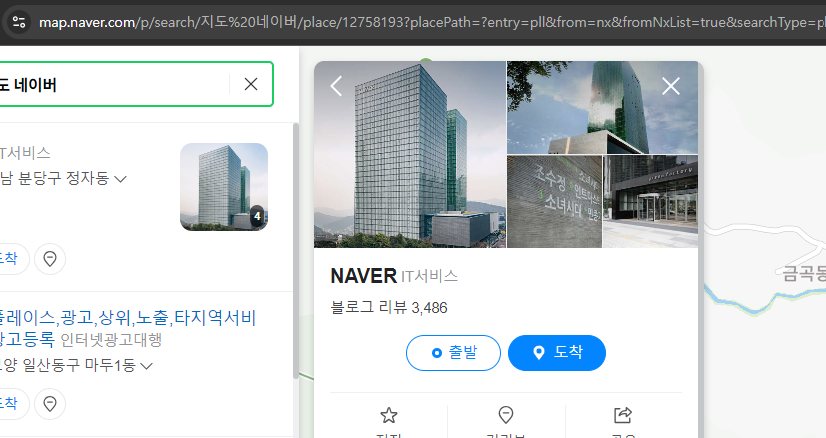
Look at the URL display area at the top. To support sharing, maps build their parameters from coordinate combinations so a specific location can be marked. In this case, a search engine cannot crawl every URL to serve users, so it maps and displays the most representative URL using the canonical URL function.
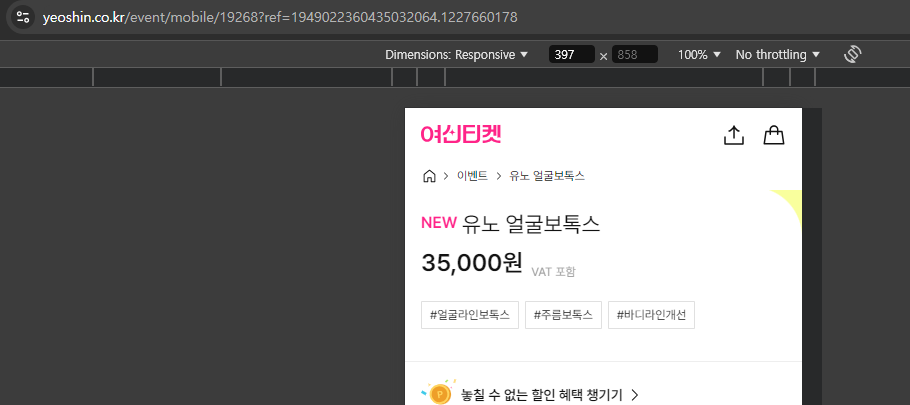
This happens not only with maps but also on sites that manage multiple product pages using the same template, or where detail pages are exposed through various parameter combinations. Operating such a site, you will frequently encounter the message "indexing failed."
To solve this, it is best to declare the canonical on the relevant URL using a single line of code: the canonical tag.
Cautions When Using the Canonical Tag
You simply insert one line between the <head></head> tags in your HTML, as shown above. But there are a few things to watch for when configuring it.
First, confirm the original page is correct. Verify that the URL you intend to declare as the standard is the right one. Setting the canonical tag to the wrong URL can actually hurt SEO performance.
When the same page is accessible via both HTTP and HTTPS protocols, the canonical tag is also needed. In this case, set the HTTPS page with the security certificate as the original so that search engines prioritize the secure page.
Pages with URL parameters such as tracking codes or session IDs often have the same content as the original but a different URL. By declaring the parameter-free original URL in the canonical, you signal that the base URL is the original and resolve the duplicate content issue as intended.
As shown, the canonical tag plays a more important role than expected in resolving duplicate content issues and improving SEO performance. Used correctly, it helps search engines understand a better content structure and improves site visibility, so treat it as essential to minimize penalties from duplicate content.
Many popular website builders such as Imweb, Cafe24, and WordPress provide canonical tags by default, so this is rarely an issue with them. However, if you build your site with PHP, Gnuboard, or similar tools, you have likely missed it, so we recommend reviewing it.

About the Author
Joshua: Lead SEO Consultant
- Built a zero-cost structure generating KRW 1.2 billion in annual revenue through SEO alone - Closed a KRW 700 billion deal through SEO alone - Low-cost, high-efficiency marketing specialist Former) Marketing Lead at a financial services firm Current) Runs SEO/GEO agency 238lab Track record) Led multiple SEO consulting projects, including Korea's No.1 AI community