
Google Optimize Shutdown
In 2023, the news of a sudden shutdown arrived. Google Optimize, actively used by many marketers and developers, was discontinued, disrupting UX optimization for companies that relied heavily on A/B testing.
Google Optimize let teams test and optimize website performance without editing code, and it was used across a wide range of sites. But no tool lasts forever. With Google Optimize gone, it is time to find a new alternative.
Why Google Optimize Was Discontinued
Google Optimize was a tool that let you run A/B tests without a dedicated developer. It was widely used in practice, allowed flexible allocation of incoming traffic, and let you measure conversion rate differences based on configured event values.
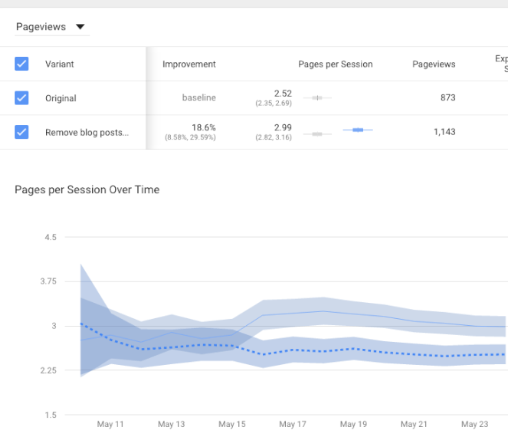
On a site that already gets heavy traffic, changing a single button can shift conversion rates. That is why this A/B testing tool was considered essential, reducing the risk of trying something new.
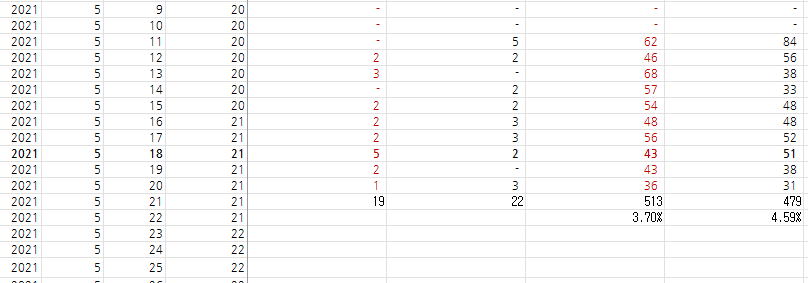
Above is data we actually used in 2021. At the time we were running review content, and simply changing the order shifted visitor conversion rate by nearly 1%.
Then in 2023, Google abruptly announced the discontinuation of Google Optimize and GA360 services. The impact on companies running marketing and UX optimization was significant. The exact reason was never made fully clear, but the leading explanation is that testing and optimization features were likely to be gradually integrated during the transition to Google Analytics 4 (GA4).
What Are the Alternatives to Google Optimize?
If you used Google Optimize, you now need a replacement tool for A/B testing and site optimization. But pricing is higher than expected, so many teams have shifted from sample-size-based A/B testing to time-period-based A/B testing.
That is right. Google had been providing an enormously valuable service for free. A variety of tools are available both overseas and in Korea: overseas options run on SaaS models, while Korean options run on consulting and proposal-based models.
1) Overseas A/B Testing Tools

(1) AB Tasty
https://www.abtasty.com/
- Features:
It offers granular optimization for ecommerce teams, and many users find its intuitive UI/UX easy to work with.
- Pricing:
Starter: free up to 10,000 tests
Growth: from $1,299/month
Scale: from $2,999/month
Enterprise: custom pricing
(2) Optimizely
- Features:
Highly versatile. Beyond A/B testing, it offers content marketing and CMS features.
- Pricing:
Basic: from $1,299/month
Pro: from $2,999/month
Enterprise: custom pricing

(3) VWO (Visual Website Optimizer)
- Features:
Known for high customer satisfaction. Its pricing advantage makes it popular with small and mid-sized businesses.
- Pricing:
Starter: from $999/month
Professional: from $2,499/month
Enterprise: custom pricing
2) Korean A/B Testing Tools

(1) Beusable
- Features:
Beusable is built around a visualization dashboard called the UX heatmap, with relatively affordable pricing. Most importantly, it offers a free trial, so you can experience usability firsthand before deciding.
- Pricing:
Free Trial: 14 days free up to 10,000 PV
SaaS: from KRW 60,000/month for 50,000 PV
Enterprise: from KRW 1,000,000/month for 1,000,000 PV

(2) PlusZero
- Features:
PlusZero runs its business around consulting that uses tools like GA4 and dashboards, and it has developed its own A/B testing capability delivered alongside its consulting services.
- Pricing:
Exact pricing is not publicly disclosed.
What Is a Free A/B Testing Alternative?
The A/B testing services that hit the market after the Google Optimize shutdown are pricier than expected, which makes them hard to justify for startups with limited budgets.
https://tagmanager.google.com/
For now, one option is to use Google Tag Manager (GTM). GTM lets you insert and manage various tags on a website without changing code, so it can also be used for A/B testing. Here is a detailed walkthrough.
* Before starting this process, you must first connect GA4 and GTM.
1) Understanding GA4 Events / Parameters
In GA4, you first define an event name, then assign additional parameter values within it. This lets you analyze data in more detail. To track A/B tests in GA4, you need to set the parameters each event requires.
- Event name: The action you want to record as a conversion. Example: test_purchase_click.
- Parameters: Additional information collected with the event. Examples: test_group (version A or B), button_color, page_version, etc.
2) User-Based Grouping
As a rule, an event is recorded once per site, so rather than running A/B tests through events, it is more accurate to split A/B groups using a unique value per user.
First, randomly assign each user to group A or B, then implement code that stores that information in a browser cookie, local storage, or a server-side database, and set the variable in GTM.
This keeps a user in the same group throughout their session, letting you measure the final conversion rate. Insert the code below into your homepage, or run it using a Custom HTML tag in GTM.
function getABTestGroup() {
// Check whether a group has already been assigned
var testGroup = localStorage.getItem('abTestGroup');if (!testGroup) {
// If no group exists, randomly assign A or B
testGroup = Math.random() < 0.5 ? 'A' : 'B';
// Store the group info in local storage
localStorage.setItem('abTestGroup', testGroup);
}return testGroup;
}
3) Setting Up Variables and Triggers
In Google Tag Manager, set the 'getABTestGroup()' function above as a Custom JavaScript variable in GTM. This lets GTM use this variable to distinguish each group and fire custom tags accordingly.
Setting Up a Custom JavaScript Variable
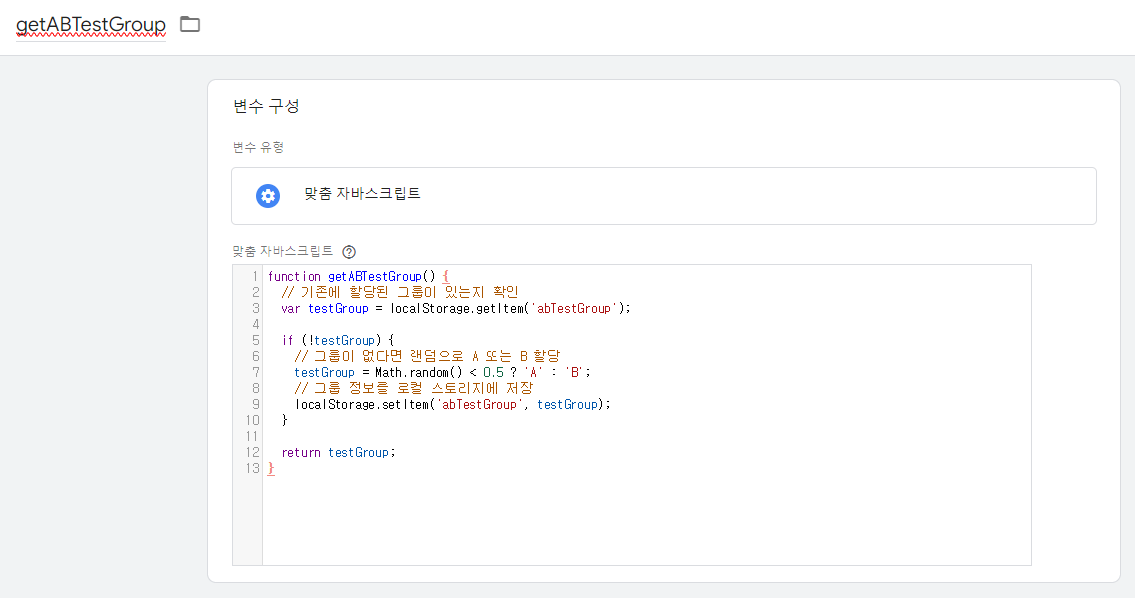
(1) Log in to GTM, then go to the Variables menu in your container.
(2) Click New under User-Defined Variables, then select Custom JavaScript.
(3) Add the getABTestGroup() function above as a variable and save.
Setting Up Triggers
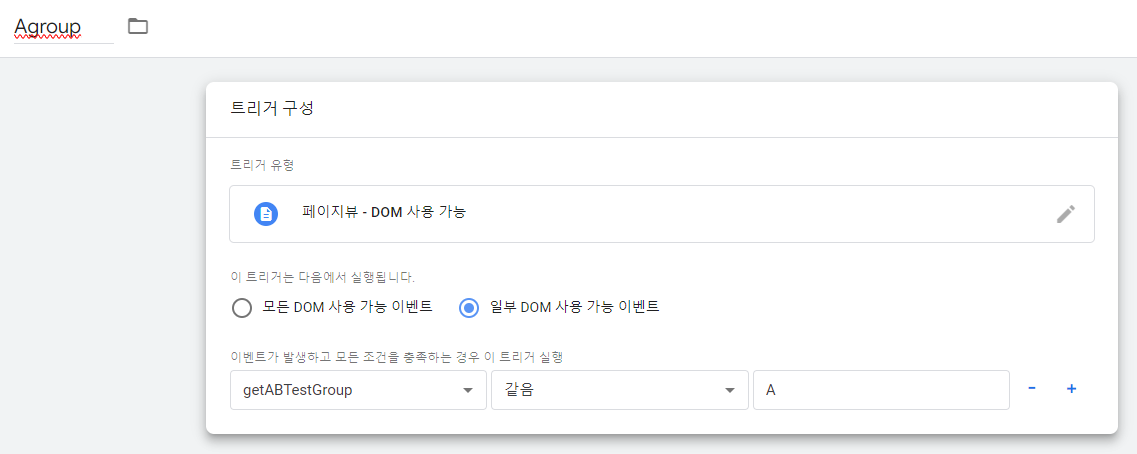
(1) Create new triggers to fire custom tags for each user group (A or B).
(2) Based on DOM Ready, set the version A trigger to {{getABTestGroup}} == 'A' and save it as group A.
(3) Set the version B trigger the same way with {{getABTestGroup}} == 'B' to define the group B trigger.
With these triggers set up, you have an environment that can run test code separately for groups A and B.
4) Inserting Custom HTML Tags per Trigger
In the final step, you need to change the site content. This is possible with GTM's Custom HTML. Create a New Tag in GTM. Personally, I tend to use JavaScript, so here is an example that hides a single button.
function modifyButtons() {
var testGroup = localStorage.getItem('abTestGroup');if (testGroup === 'B') { // Hide a specific button for group B var secondButton = document.querySelector('.button-class-2'); // class name of the second button
if (secondButton) {
secondButton.style.display = 'none'; // hide the button
}
}
}
Setting Up the Custom HTML Tag
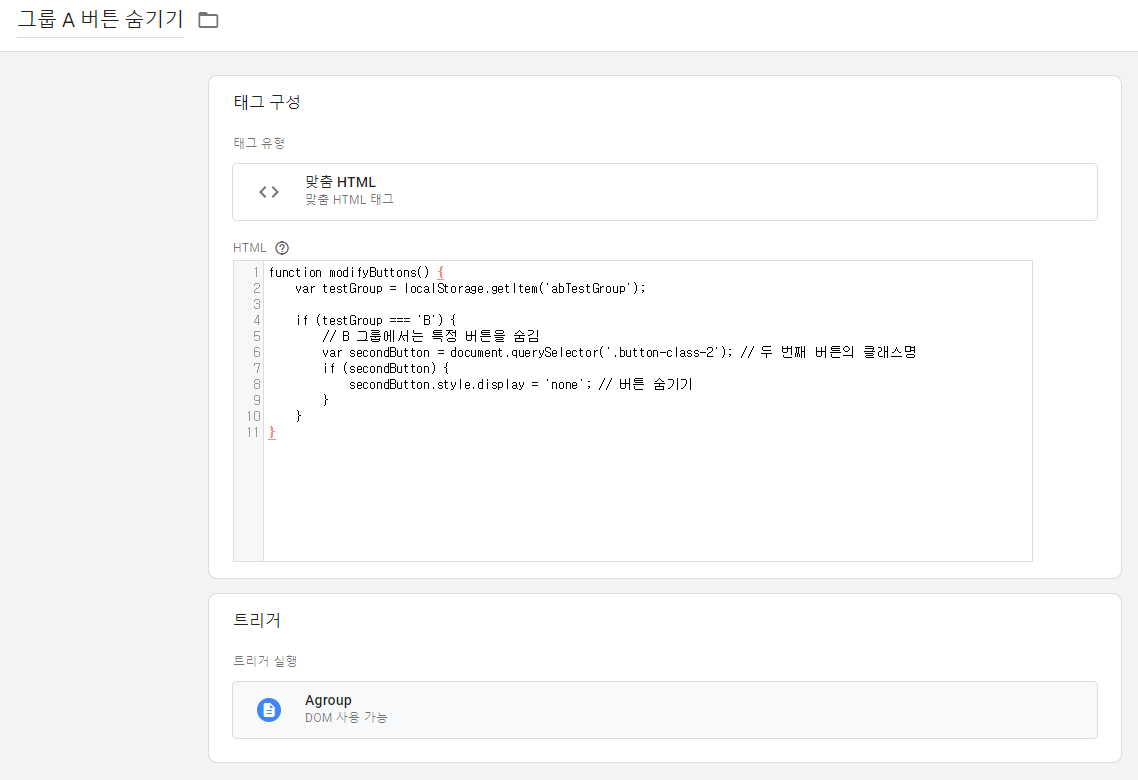
(1) Select Custom HTML as the tag type.
(2) Enter the modifyButtons function above.
(3) In the trigger settings, set a trigger matching the condition {{abTestGroup}} == 'B'.
(4) Save the tag and configure it so only users in group B run this script.
Finally, use GTM's Preview mode to confirm the test works correctly, and you are done. Check how users are assigned to groups A and B and whether the JavaScript runs properly, then publish.
Today we covered the shutdown of Google Optimize, alternative tools, and how to run A/B tests for free using Tag Manager.
As UX analysis grows ever more important, if you have internal resources to spare, it matters to run A/B tests directly with GTM or to actively improve site conversion rates using external tools.
A change to a single button can drive a bigger revenue shift than you might expect. Run A/B tests consistently and they will lead to strong results.

About the Author
Joshua: Lead SEO Consultant
- Built a zero-cost structure generating KRW 1.2 billion in annual revenue through SEO alone - Closed a KRW 700 billion deal through SEO alone - Low-cost, high-efficiency marketing specialist Former) Marketing Lead at a financial services firm Current) Runs SEO/GEO agency 238lab Track record) Led multiple SEO consulting projects, including Korea's No.1 AI community